Nested menus
A nested menu groups related entries inside a menu section. For example, a DCIM section can hold a Device catalog group with the device types, platforms and manufacturers that your team maintains, separate from the devices and interfaces it operates.
You can nest menu entries in two ways:
- In a menu file, give a menu item
children, and give those children their ownchildren. The menu file sets the label, icon and order of every entry, at every level. - In the schema, set
menu_placementon a node to put its entry under the entry of another node. This applies to the menu that Infrahub generates for nodes that no menu file defines.
Prerequisites
- A running Infrahub instance
- Knowledge of how to define and load a menu file, described in Menu customization
Schema used in this guide
The examples on this page use the schema from Menu customization, plus the following nodes. The IP prefix and IP address nodes make Infrahub show the built-in IPAM section.
---
version: "1.0"
nodes:
  - name: DeviceType
    namespace: Dcim
    label: Device Type
    include_in_menu: false
    attributes:
      - name: name
        kind: Text
        unique: true
  - name: Platform
    namespace: Dcim
    include_in_menu: false
    attributes:
      - name: name
        kind: Text
        unique: true
  - name: Cable
    namespace: Dcim
    include_in_menu: false
    attributes:
      - name: name
        kind: Text
        unique: true
  - name: Manufacturer
    namespace: Organization
    include_in_menu: false
    attributes:
      - name: name
        kind: Text
        unique: true
  - name: Prefix
    namespace: Ipam
    include_in_menu: false
    inherit_from:
      - BuiltinIPPrefix
  - name: IPAddress
    namespace: Ipam
    label: IP Address
    include_in_menu: false
    inherit_from:
      - BuiltinIPAddress
  - name: VLAN
    namespace: Ipam
    label: VLAN
    include_in_menu: false
    attributes:
      - name: name
        kind: Text
      - name: vlan_id
        kind: Number
Group menu entries inside a section
A menu item with children is a group. Each child can have its own children, and a menu file has no limit on the number of levels.
The following menu file defines a DCIM section with two groups. Devices holds the entries for devices and interfaces, and Device catalog holds the entries for device types, platforms and manufacturers:
# yaml-language-server: $schema=https://schema.infrahub.app/infrahub/menu/latest.json
---
apiVersion: infrahub.app/v1
kind: Menu
spec:
  data:
    - namespace: Dcim
      name: Mainmenu
      label: DCIM
      icon: "mdi:server-network"
      children:
        data:
          - namespace: Dcim
            name: DevicesMenu
            label: Devices
            icon: "mdi:router"
            children:
              data:
                - namespace: Dcim
                  name: Device
                  label: Devices
                  kind: DcimDevice
                  icon: "mdi:router"

                - namespace: Dcim
                  name: Interface
                  label: Interfaces
                  kind: DcimInterface
                  icon: "mdi:ethernet"

          - namespace: Dcim
            name: CatalogMenu
            label: Device catalog
            icon: "mdi:book-open-variant"
            children:
              data:
                - namespace: Dcim
                  name: DeviceType
                  label: Device types
                  kind: DcimDeviceType
                  icon: "mdi:poll"

                - namespace: Dcim
                  name: Platform
                  label: Platforms
                  kind: DcimPlatform
                  icon: "mdi:application-cog-outline"

                - namespace: Organization
                  name: Manufacturer
                  label: Manufacturers
                  kind: OrganizationManufacturer
                  icon: "mdi:factory"
Load the file:
infrahubctl menu load menus/dcim.yml
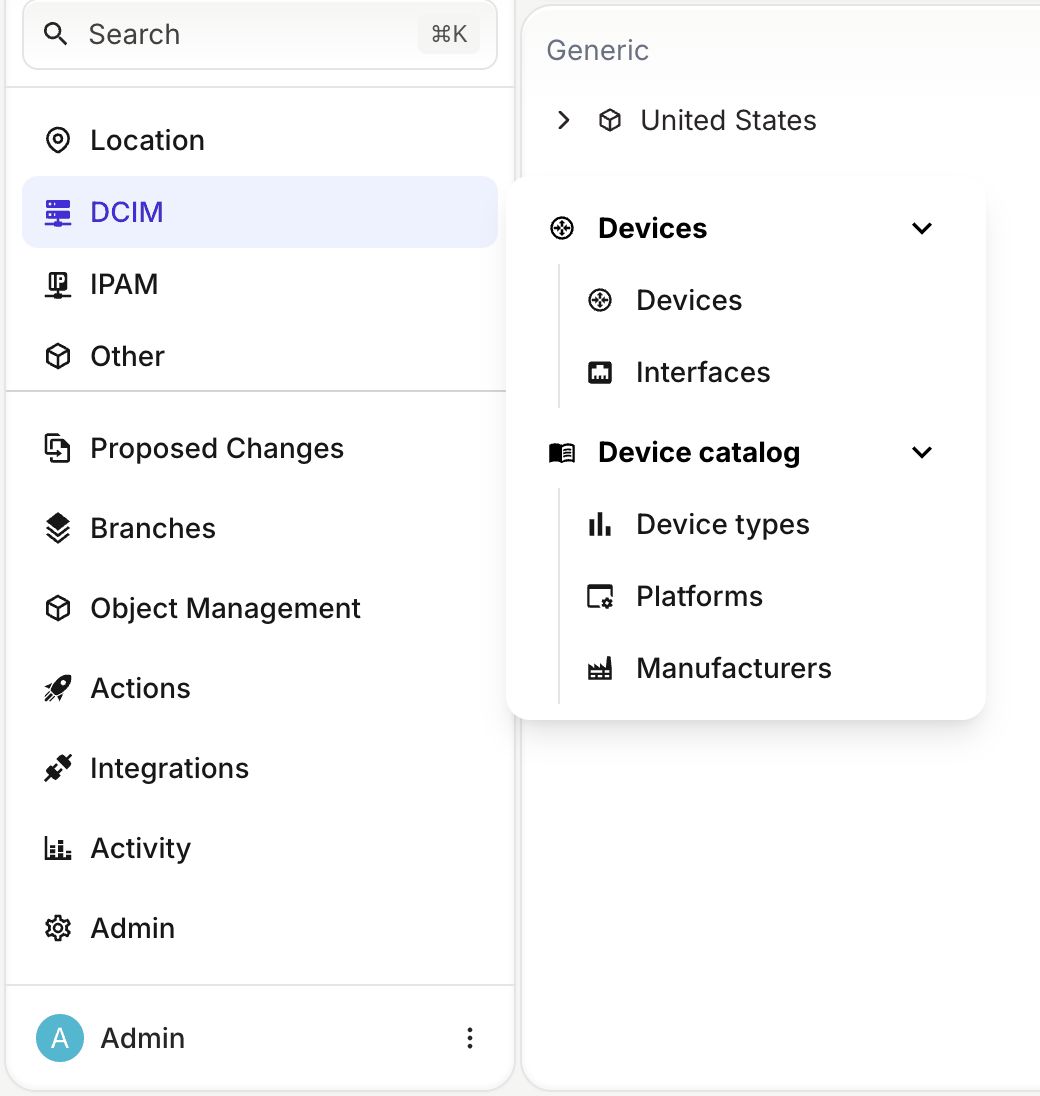
Select DCIM in the menu. The section opens a panel with the Devices and Device catalog groups. Each group is expanded, with its entries listed below its name. Select the arrow next to a group to collapse it:
A group inside a section can also open a list view. Give it a kind as well as children, and its name becomes a link to the list view of that kind. A section at the top level of the menu only opens its panel, even when it has a kind.
Add entries to a menu item from another file
To add entries to a section or a group that another menu file defines, set parent on the new item to the namespace and name of that menu item, as a list. With separate files, a team can maintain the entries for its own nodes without editing the file that defines the section.
For example, the following file adds a Cabling group to the DCIM section:
# yaml-language-server: $schema=https://schema.infrahub.app/infrahub/menu/latest.json
---
apiVersion: infrahub.app/v1
kind: Menu
spec:
  data:
    - namespace: Dcim
      name: CablingMenu
      label: Cabling
      icon: "mdi:cable-data"
      order_weight: 3000
      parent:
        - Dcim
        - Mainmenu
      children:
        data:
          - namespace: Dcim
            name: Cable
            label: Cables
            kind: DcimCable
            icon: "mdi:cable-data"
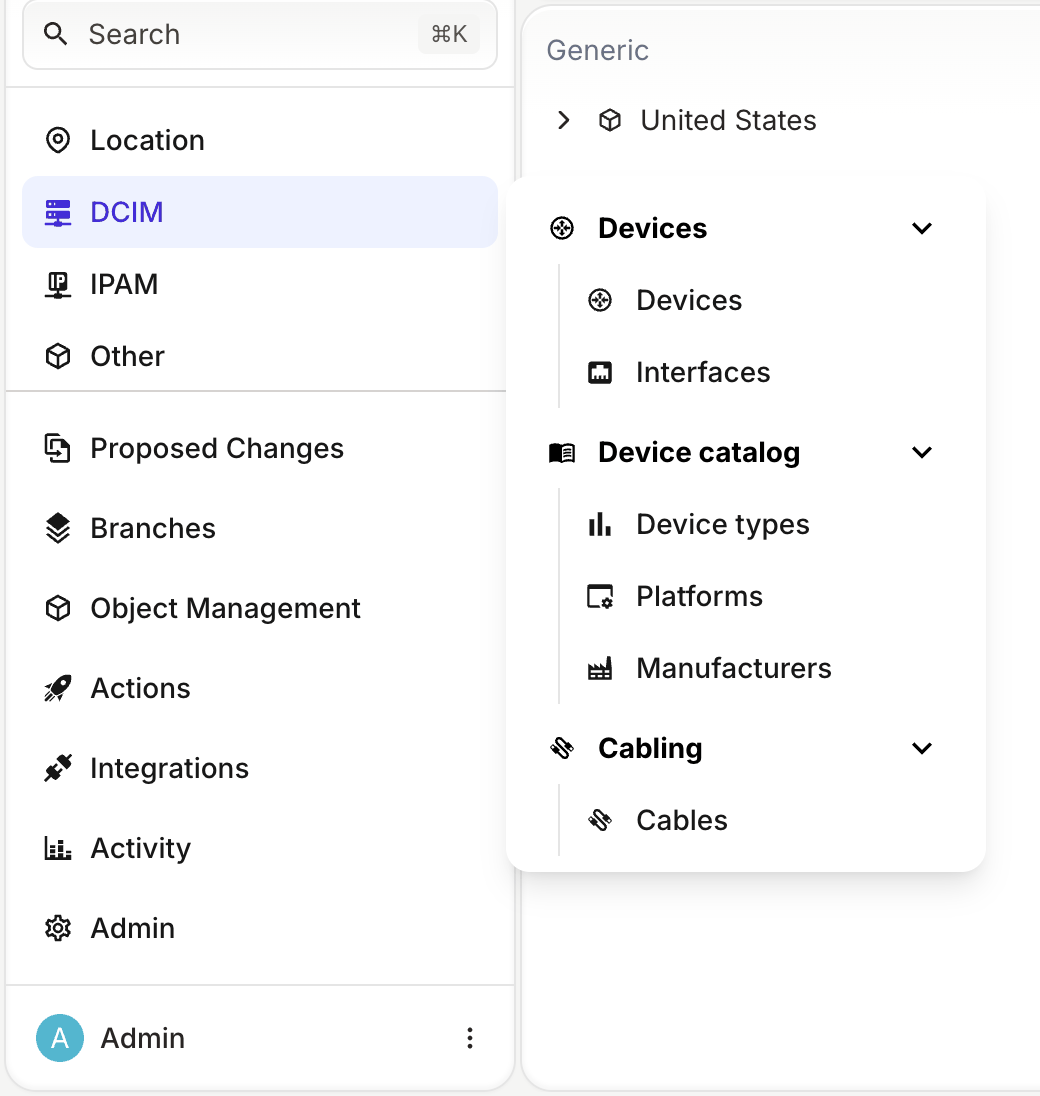
After you load the file, the DCIM panel shows Cabling after Device catalog:
Load the file that defines the parent item first. When the parent item does not exist, infrahubctl menu load stops with an error such as Unable to find the node Dcim :: Mainmenu / CoreMenu in the database. and creates no menu item. When you pass a folder to infrahubctl menu load, it loads the files in the alphabetical order of their names.
Add entries to the built-in IPAM section
The IPAM section is built in: you do not define it in a menu file, but you can add entries to it. Its namespace is Builtin and its name is IPAM. The following file adds a VLANs entry to it:
# yaml-language-server: $schema=https://schema.infrahub.app/infrahub/menu/latest.json
---
apiVersion: infrahub.app/v1
kind: Menu
spec:
  data:
    - namespace: Ipam
      name: VLAN
      label: VLANs
      kind: IpamVLAN
      icon: "mdi:lan"
      order_weight: 4000
      parent:
        - Builtin
        - IPAM
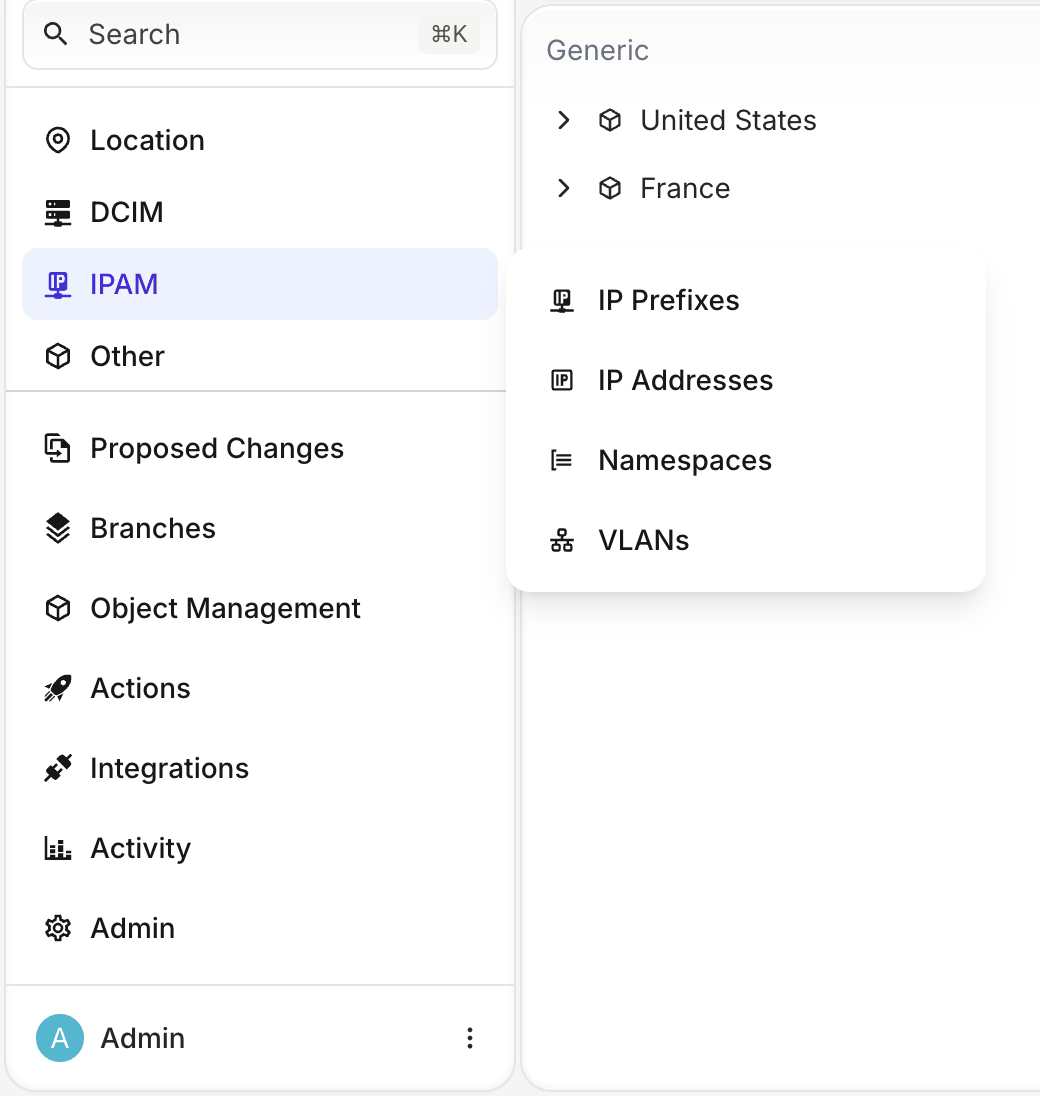
The built-in IP Prefixes, IP Addresses and Namespaces entries have order weights 1000, 2000 and 3000, so an order weight of 4000 puts VLANs after them:
Order of nested entries
Infrahub sorts the entries at each level of the menu by order_weight, lowest first.
When an item in a children list has no order_weight, infrahubctl menu load sets one from the position of the item in the list: 1000 for the first item, 2000 for the second, and so on.
Items at the top of a menu file do not get an order weight from their position, and this includes items that you add with parent. Their order weight is 2000 unless you set one. Without order_weight: 3000, the Cabling group in the earlier example would have the same order weight as Device catalog. Set order_weight on every item that you add with parent.
Nest nodes in the generated menu
Infrahub generates a menu entry for every node that has include_in_menu: true, which is the default, unless a menu file defines an item with the same namespace and name as the node. Without menu_placement, each of these nodes gets its own entry at the top level of the menu.
To put the entry of a node under the entry of another node, set menu_placement on it to the kind of that other node. The following properties put interfaces, device types and platforms under devices:
nodes:
  - name: Device
    namespace: Dcim
    include_in_menu: true
    icon: "mdi:router"
  - name: Interface
    namespace: Dcim
    include_in_menu: true
    menu_placement: DcimDevice
    icon: "mdi:ethernet"
  - name: DeviceType
    namespace: Dcim
    include_in_menu: true
    menu_placement: DcimDevice
    icon: "mdi:poll"
  - name: Platform
    namespace: Dcim
    include_in_menu: true
    menu_placement: DcimDevice
    icon: "mdi:application-cog-outline"
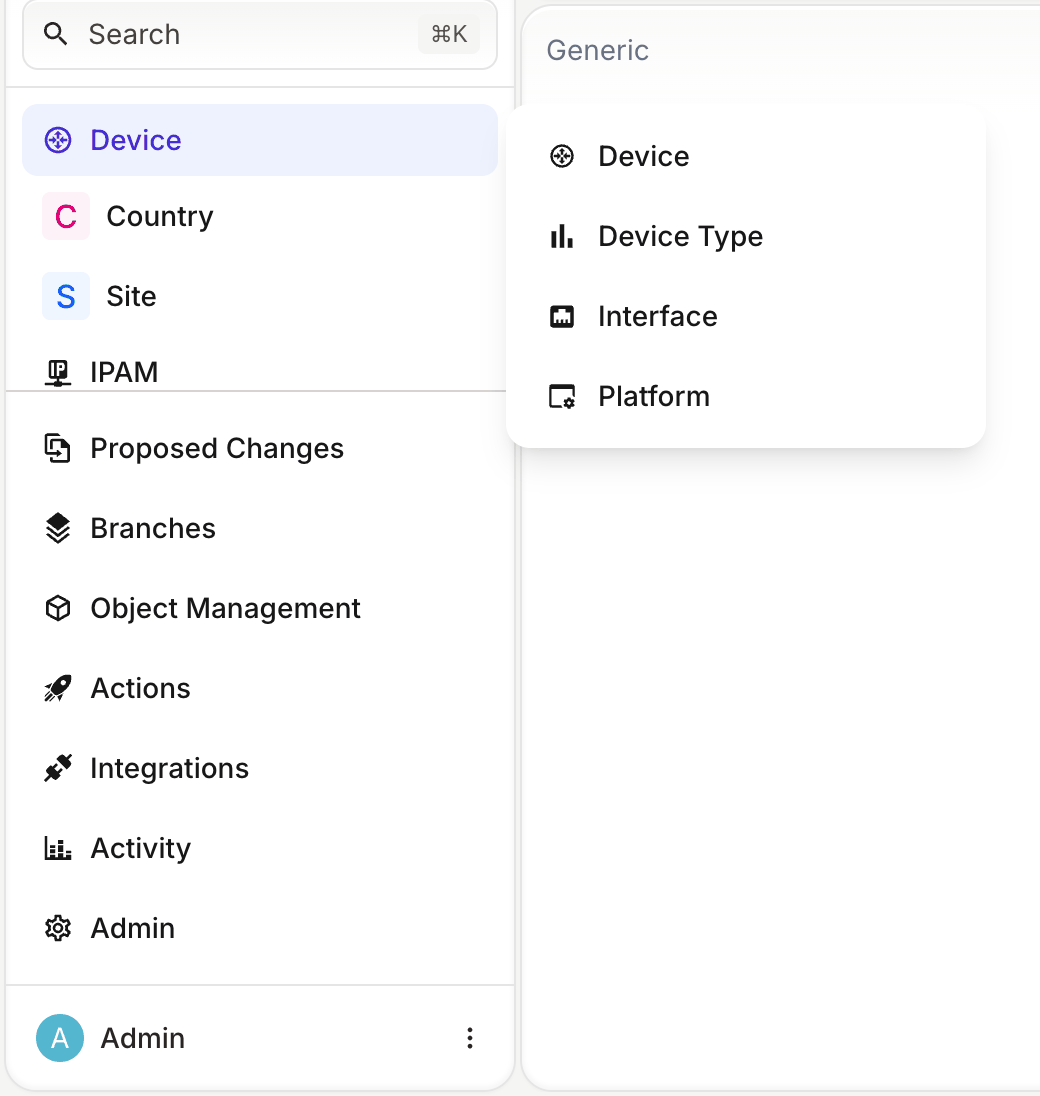
The Device entry then opens a panel. Its first entry opens the list of devices, and the entries for interfaces, device types and platforms follow it:
- The schema has no property to set the order of the entries under a node. They all have an order weight of 5000. To control the order, define the entries in a menu file.
- When
menu_placementnames an entry that does not exist in the menu, Infrahub puts the entry of the node under Other.
Related pages
- Menu customization: define and load a menu file
- Menu definition file: every key of a menu item