Git Integration
Connect an external Git repository to keep the code that drives Infrahub — schemas, Transformations, Generators, checks, GraphQL queries, and artifact definitions — under version control, next to your infrastructure data. Infrahub imports that code and keeps it in sync as the repository changes.
To set one up, see connect a repository, configure .infrahub.yml, and filter which branches sync.
Two version-control planes
Infrahub has two separate version-control systems, and understanding the split is the key to the rest of this section.
- The graph — your infrastructure data (objects) and schema. Infrahub versions the graph itself: you branch it, change it, review the diff in a Proposed Change, and merge. This is Git-like version control, but the store is Infrahub's database, not a Git repository.
- Git — the code that describes intent: schemas, Transformations, Generators, checks, GraphQL queries, and artifact definitions, declared in
.infrahub.yml. Infrahub reads this code from the repository and imports it.
The link between the two runs one way: from Git into Infrahub. Git is where you author code intent; Infrahub imports it and applies it to the graph. Data moves the other way only inside Infrahub — when you merge a branch, the change is applied to the graph, not pushed back to Git. A read-write repository does write one thing back to Git, and only one; the repository types section covers it.
Why Git integration matters
Modern infrastructure management requires both structured data (network configurations, device inventories) and code (automation scripts, templates, validation logic). By integrating with Git repositories, Infrahub bridges these two worlds, enabling:
- Unified version control: Both your infrastructure data and automation code follow the same branching and merging workflows
- Familiar developer workflows: Teams can leverage existing Git practices and tooling
- Separation of concerns: Infrastructure data resides in Infrahub's graph database while code remains in Git
- Enhanced collaboration: Multiple teams can work on different aspects of infrastructure without conflicts
Repository types and their design rationale
Infrahub supports two distinct repository connection types, each designed for specific use cases and operational requirements.
Repository: read-write integration
The standard Repository type gives Infrahub read-write access to Git. For branches that sync with Git, Infrahub imports code from the Git branch automatically, and on a Proposed Change merge it updates the linked Git branch (see Choosing whether a branch syncs with Git).
Design principles:
- Branch parity: each Git branch that Infrahub imports has an Infrahub branch of the same name, except the branch named in the repository's
default_branchattribute, which Infrahub imports into its default branch - Automatic import: Infrahub imports changes from Git in the background, without a manual trigger
- One write-back on merge: merging a Proposed Change updates the linked branch in Git (see merging branches below); this moves code intent, never your infrastructure data
How it works internally:
When you create a Repository connection, Infrahub:
- Clones the repository to local storage
- Creates Git worktrees for each branch to enable parallel operations
- Tracks the remote branches, and creates an Infrahub branch for each new remote branch, or only for those whose names match the selective synchronization rules when you configure them
- Runs background synchronization tasks every few seconds to detect changes
- Parses the
.infrahub.ymlfile to determine which resources to import
When you merge a Proposed Change and the source branch is set to sync with Git, Infrahub merges the corresponding branch in the Git repository and pushes the result to the remote. By default this is a fast-forward when possible, so no merge commit is created (see merging branches). Only the code tracked in Git moves; your infrastructure data stays in the graph.
The push runs after the merge in Infrahub, as a background task, and it can fail, for example when the remote is unreachable or a branch protection refuses it. The merge in Infrahub stays complete, and Infrahub keeps the merge in the push queue of the repository. Infrahub retries the push automatically when the cause can clear by itself, records the push state in the delivery_* attributes of the repository, and pauses the import of the remote default branch and the regeneration that the repository defines until the queue is empty. To retry or abandon the pending pushes, see when a push to the remote fails.
A read-write repository has a default_branch attribute (defaulting to main) that names the Git branch mapped to Infrahub's default branch. Merges into Infrahub's default branch are pushed back to that Git branch on the remote, and that Git branch is imported as Infrahub's default branch, so a repository can use a non-main Git default branch. When default_branch is not main, a Git branch literally named main is not imported.
When a remote branch is skipped, Infrahub records a warning in the repository's Tasks tab. The warning names the skipped branch and the repository's default_branch. A push to the skipped branch does not import it; Infrahub records the warning instead.
The warning appears:
- In the "Adding repository" task, when you add the repository on Infrahub's default branch.
- In a later synchronization task, when that synchronization imports a branch or detects a new commit on the skipped branch.
A successful synchronization where nothing changed on the remote adds no task. If you add the repository on another Infrahub branch, Infrahub imports no other remote branches until you merge that branch, so the first warning comes from a synchronization after the merge.
With more than one task worker, a push to the skipped branch is not always reported. Each worker compares the new commit against its own copy of the repository, and a fetch triggered by another worker can update that copy first. The same push can also be reported by more than one worker.
Read-only Repository: controlled unidirectional flow
The Read-only Repository type offers a simpler, unidirectional integration designed for scenarios where you need to consume resources from Git without modifying the external repository.
Design principles:
- Single reference tracking: links one specific Git ref (branch, tag, or commit)
- Manual synchronization: Infrahub does not import from a read-only repository on its own; you update it by changing the
refor using the Import latest commit action. On a schedule, the read-only refs check reads the commit that each trackedrefpoints to on the remote, but it never imports - Protection of external resources: guarantees no modifications to the external repository
How it works internally:
Read-only repositories:
- Track a single Git reference rather than all branches
- Import changes only when you change the
refor run Import latest commit. The read-only refs check finds new commits on the remote, but it does not import them - Import resources according to the
.infrahub.ymlconfiguration - Maintain a simpler state model without complex branch synchronization logic
Architecture and data flow
Understanding how Infrahub manages Git repositories helps clarify the system's capabilities and constraints.
Component responsibilities
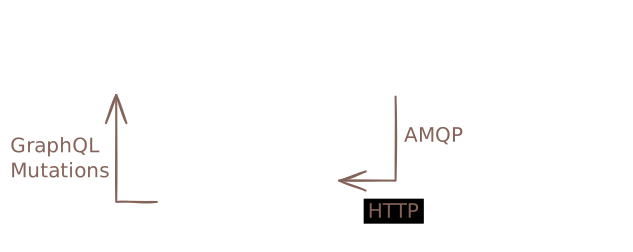
The architecture carefully separates concerns between components:
- Infrahub API Server: Never directly connects to Git repositories; handles GraphQL mutations and queries
- Task Workers: Manage all Git operations including cloning, fetching, and pushing
- Message Broker: Coordinates communication between API server and task workers
- File System Storage: Maintains local clones and worktrees in
git.repositories_directory
This separation ensures that Git operations don't block API requests and enables horizontal scaling of task workers for improved performance.
Synchronization mechanisms
For standard Repositories:
- Background tasks poll for changes multiple times per minute
- Each sync operation fetches from origin and compares local vs. remote state
- New branches automatically trigger Infrahub branch creation
- Updated branches trigger re-import of changed resources
For Read-only Repositories:
- No automatic import occurs. On a schedule, the read-only refs check reads the commit that each tracked
refpoints to on the remote, so that the Commits tab can list new commits, but it does not import them - Updates can be triggered by modifying the
refproperty to point to a different branch, tag, or commit - Alternatively, use the Import latest commit action to fetch the latest commit for the current ref from the remote without changing the ref
- Each update fetches the specified commit and imports resources according to configuration
Merging branches
This applies only to standard repositories:
By default, Infrahub runs a standard git merge, which fast-forwards when the history allows it. When merging a branch linked to Git, Infrahub moves the destination branch pointer forward without creating a merge commit; if the branches have diverged, Git falls back to a merge commit.
You can configure Infrahub to always create a merge commit by setting the INFRAHUB_GIT_USE_EXPLICIT_MERGE_COMMIT environment variable to true. This approach maintains a more explicit commit history and improves auditability.
Choosing whether a branch syncs with Git
Each Infrahub branch has a sync_with_git property, chosen when you create the branch. It sets whether Infrahub syncs the branch with read-write repositories, in both directions:
- When it is on, Infrahub creates a matching branch in every read-write repository, imports the commits pushed to that Git branch, and merges the branch in Git on a Proposed Change merge.
- When it is off, the branch exists only in Infrahub. Infrahub creates no Git branch for it and imports no commits from a Git branch of the same name, even when that name matches the selective synchronization rules.
The exception is Infrahub's default branch, whatever its sync_with_git value: Infrahub always imports the commits of the Git branch named in the repository's default_branch attribute into it. A branch that Infrahub creates from a new Git branch has sync_with_git on. If you only change data on a branch, you do not need a Git branch for it: Infrahub stores that data in its graph, not in Git.
The .infrahub.yml configuration file
The .infrahub.yml file acts as a manifest, declaring which resources Infrahub should import from the repository. This declarative approach enables:
- Selective importing of repository contents based on specific needs
- Clear boundaries between Infrahub-managed and external resources
- Version-specific configurations (different branches can have different
.infrahub.ymlfiles)
For detailed information about .infrahub.yml configuration and syntax, see Infrahub configuration file.
Status tracking and health monitoring
A read-write repository tracks its operational state through four distinct status dimensions, each serving a different monitoring purpose. A read-only repository has the first three.
Admin status: lifecycle management
Tracks whether Infrahub is actively using the repository:
- Active: Repository is in production use
- Inactive: Repository is disabled or unused
- Staging: Repository was added on a branch other than the default branch. A read-write repository becomes active when that branch is merged into the default branch, through a proposed change or directly.
Operational status: connectivity health
Monitors the connection between Infrahub and the Git server:
- Online: Successfully connected and authenticated
- Credential Error: Authentication failure
- Connectivity Error: Network or connectivity issue
- Error: Other initialization or configuration problems
- Unknown: Status cannot be determined
Sync status: data consistency
Indicates the state of data synchronization. Infrahub records it per branch:
- In Sync: All repository resources are current in Infrahub
- Syncing: Synchronization operation in progress
- Import Error: Failed to import resources from repository, as described in when the import of a branch fails
- Tracked Ref Missing (read-only repositories only): The branch or tag in
refwas missing from the remote when the read-only refs check last ran. Infrahub keeps using the commit it imported last - Unknown: Synchronization state cannot be determined
When the tracked ref of a read-only repository is deleted
When the read-only refs check finds that a Git branch or tag named in ref no longer exists on the remote, Infrahub sets the sync status to Tracked Ref Missing on each Infrahub branch whose own ref names it. The default branch always has its own ref. A branch that inherits its ref from the default branch keeps its own sync status.
On a branch with this status:
- Infrahub refuses to merge the branch, and the Repository Import Check of its Proposed Change fails. See Merge a branch.
- The Commits tab shows a warning that the tracked ref no longer exists on the remote, and lists the history from the commit Infrahub still uses.
- The sync status indicator in the header does not turn red. It reports only Import Error.
When the branch is imported again and the ref exists on the remote, for example after you change the ref, Infrahub sets the status back to In Sync. To clear the status, see troubleshoot repository connections.
Push status: merges waiting for the remote
Stored in the delivery_status attribute of a read-write repository. Read it on the default branch:
- Nothing pending (
none, or no value): No merge waits to be pushed to the remote - Pending (
pending): A push runs, is about to run, or waits for an automatic retry - Action required (
action-required): No automatic retry is planned; retry or abandon the pending pushes, as described in when a push to the remote fails
When the import of a branch fails
An import reads one commit of the repository and applies what .infrahub.yml declares to one Infrahub branch. When the import fails, Infrahub sets the sync status of the repository on that branch to Import Error, and the task of the import, Import objects into branch <branch>, records the cause. To read it, select that branch and open the Tasks tab of the repository. While the status is Import Error, Infrahub refuses to merge the branch, as described in Merge a branch.
Entries in .infrahub.yml that fail the import
The import fails when .infrahub.yml contains one of these entries:
- A schema path that does not exist, or a schema directory that contains no
.yml,.yaml, or.jsonfile - A Jinja2 Transformation whose template file is missing, is empty, is not UTF-8 text, cannot be parsed, or is outside the repository
- A Python Transformation or a check whose
class_nameis not defined in the module thatfile_pathnames
None of the import is applied while one of these entries is in .infrahub.yml. To fix an entry, see troubleshoot repository connections.
Before Infrahub 1.12, Infrahub logged a warning for a missing schema path, or for a Python Transformation or check that it could not load, and imported the rest of the branch. It also registered a Jinja2 Transformation whose template had a problem, and that Transformation failed later, when an artifact was generated. After you upgrade, Infrahub sets the branch to Import Error at the next import of a branch whose .infrahub.yml contains one of these entries.
What the task log shows
For a problem in the content of the repository, such as an invalid schema, object file, or GraphQL query, the task log has one error line that names the branch, the .infrahub.yml entry, and the cause, without a Python traceback:
Failed to import branch 'main': Schema 'schemas/network.yml': The path does not exist
A failure that Infrahub does not recognize is logged once, with its traceback.
A warning follows the error line. It names the import step that was running when the import stopped, the steps that completed, and the steps that did not run:
Import of branch 'main' stopped while importing the schema. Completed: none. Not run: GraphQL queries; Python transforms; Jinja2 transforms; objects and menus; check definitions; generator definitions; artifact definitions; generator actions and trigger rules from object files; deletion of removed GraphQL queries, transforms, checks and generators.
The steps run in the order of that list. A step with nothing to import is listed among the completed steps. When the import stops while Infrahub reads the repository, before the first step, the warning says Import of branch '<branch>' stopped before any import step ran, so nothing was imported.
Infrahub does not undo the steps that completed. When an import stops after the first step, the branch keeps what Infrahub imported in the completed steps, and has no changes from the steps that did not run. At the next successful import of the branch, Infrahub applies every step.
Failures on other branches and repositories
When the import of one branch fails, Infrahub still imports the other branches of the repository. When the synchronization of one repository fails, Infrahub still synchronizes the repositories after it.
A connection or credential error is different. Infrahub sets the branch to Import Error, stops the synchronization of that repository until the next cycle, and does not write the step summary.
When the remote history is rewritten
The history of a Git branch on the remote is rewritten when someone replaces commits instead of adding to them, for example with git push --force after a rebase, or after removing a commit that leaked a credential. The commit that Infrahub imported is then no longer part of the history of that branch.
Read-write repositories import the new history
At the next synchronization, the task worker moves its copy of the Git branch to the new head of the remote branch, and Infrahub imports that commit into the matching Infrahub branch. You do not need to take any action. Commits that exist only in the old history are discarded from the copy of the task worker. The synchronization task logs a line such as:
Reconciled branch infra/vlan-update of repository network-config with the remote history: <imported commit> was discarded and replaced by <new head>
Infrahub does not import the new head, rewritten or not, into these Infrahub branches:
- A branch with
sync_with_gitoff, other than the default branch. See choosing whether a branch syncs with Git. - A branch whose status is
NEED_REBASE,MERGING,MERGE_FAILED,MERGED, orDELETING. - The default branch, and the branches that pending merges come from, while the repository has pending pushes. See what waits while a push is pending.
Infrahub refuses to merge a branch whose Git branch was rewritten until it has imported the new head, because the remote then has a commit that Infrahub has not recorded. See Merge a branch.
Read-only repositories import the new commit on request
Infrahub does not import from a read-only repository on its own, so after a rewrite Infrahub keeps the imported commit until you run Import latest commit. Infrahub then fetches from the remote and imports the commit that the ref points to now, also when the tracked branch was force-pushed or the tracked tag was moved to another commit. Every task worker then moves its copy to that commit. The Commits tab shows that the history was rewritten before you import, as described in the Commits tab.
The rewrite record of each branch
Infrahub records the last rewrite of each Infrahub branch in four read-only attributes, on both repository types:
last_rewrite_previous_commit: the commit Infrahub had imported on the branch before the last rewritelast_rewrite_commit: the commit Infrahub moved the branch to after the last rewritelast_rewrite_at: when Infrahub detected the last rewriterewrite_count: how many rewrites the branch has seen, including the rewrites on the default branch before the branch was created
For a read-write repository, Infrahub updates them during the synchronization that imports the new history. For a read-only repository, Infrahub updates them when you run Import latest commit and the imported commit is no longer in the history of the tracked branch or tag. A tag moved forward, to a newer commit in the same history, is not a rewrite.
Infrahub does not count these changes as rewrites:
- A change of the
default_branchof a read-write repository, when the synchronization processes it within seven days - A change that you make to the
reforcommitof a read-only repository
The On this branch card of the repository details page lists the four attributes for the branch you select. To read them with GraphQL, query the repository on that branch:
query RepositoryRewrites($name: String!) {
  CoreGenericRepository(name__value: $name) {
    edges {
      node {
        last_rewrite_previous_commit { value }
        last_rewrite_commit { value }
        last_rewrite_at { value }
        rewrite_count { value }
      }
    }
  }
}
Limits of a history rewrite
- A task that reads the repository at a commit that the rewrite removed from the remote succeeds or fails depending on the task worker that runs it. Infrahub keeps the old commit on an Infrahub branch that does not import the new head, for example a branch with
sync_with_gitoff. A task worker whose clone still contains that commit runs the task. A task worker that cloned the repository after the rewrite cannot fetch the commit from the remote, so the same task fails there. - The import deletes the GraphQL queries, Python Transformations, Jinja2 Transformations, check definitions, Generator definitions, objects and menus that the new history no longer declares. It does not delete artifact definitions or schema. Schema has no link to the repository that loaded it, so the import leaves the schema from the removed commits in place. To remove that schema from the branch, see how to remove a schema element.
Repository actions and operations
Beyond basic synchronization, repositories support administrative actions for troubleshooting and maintenance:
- Check connectivity: Validates network access and authentication without modifying repository content. For a read-write Repository the check also confirms that Infrahub can push to the remote, so credentials that can read but not push are caught here rather than at the first branch creation or merge. The result is recorded in the repository's operational status: a successful check sets it to Online, while a failure sets it to the matching error state by cause - a permission or authentication failure to Credential Error, a transport failure (unreachable host, timeout, TLS) to Connectivity Error, and anything else to Error. Online confirms repository-level write access only; it does not evaluate branch protection, push rules, or pre-receive hooks, which apply only when a real push is attempted. The write check is also effective only on Git servers that enforce write authorization when advertising the receive-pack service (such as GitHub and GitLab); on servers that defer that check to the actual push, a read-only credential can still be recorded Online
- Reimport current commit: Forces re-processing of the current commit without fetching new changes, useful for recovering from import errors. Refused while the repository has pending pushes
- Retry push and Abandon pending push (read-write repositories only): Select Retry push, or send the
InfrahubRepositoryDeliveryRetrymutation, to push the pending merges of the repository to the remote again. Select Abandon pending push, or send theInfrahubRepositoryDeliveryAbandonmutation, to drop every pending merge of the repository without a push. Infrahub keeps a record of the abandoned merges. See retry the pending pushes and what an abandonment leaves behind - Import latest commit (read-only repositories only): Fetches the latest commit from the remote for the tracked ref and imports its resources. This is useful when the remote repository has new changes and you want to pull them without manually updating the
refproperty. Unlike changing theref, this operation keeps the same ref but updates to whatever commit that ref currently points to on the remote
The repository details page
The details page of a repository shows which values apply to the whole repository and which apply only to the branch you selected, the state of the repository on every branch, and what Infrahub is running on it now. Its cards appear in this order:
- Details: the values that are the same on every branch, such as the location and the operational status.
- On this branch, with the name of the branch you selected: the values that Infrahub records per branch, such as the commit, the sync status, the rewrite record, and the
refof a read-only repository. When you select another branch, only this card changes. - Branches, titled Infrahub branches for a read-only repository: one row per branch, with the branch name, the branch status, the sync status, the commit and, for a read-only repository, the
ref. The default branch is marked, and the number of branches is shown next to the title. For a read-write repository, the card lists only the branches that sync with Git. Search the branch names, filter by branch name, branch status, or sync status, for example to list only the branches with Import Error, and sort by when a branch was created or last updated. The card shows 10 rows per page and stores the page, the filters, and the sort in the URL, so the view stays the same after a reload, and you can share the link. The card reads the same rows as theInfrahubRepositoryBranchStatusquery. - Repository activity: the run that is in progress on the repository, with its operation, its step and branch, the worker that runs it, and how long it has been running. The card names the worker that holds the repository lock, and, under Last runs, the branches that the last run of each operation changed or failed on. The operations are Sync, Reimport, Pull, Add, Branch creation, and Merge. The card shows the same activity on every branch.
- Push to remote, for a read-write repository only: the pushes of merged branches that wait for the remote, as described in read the push state of a repository.
To read the activity with GraphQL, use the InfrahubRepositoryActivity query with the repository ID or name. It returns the runs in active_runs, the last run of each operation in last_runs, and the holder of the repository lock in lock.
The Commits tab and commits not yet imported
Every repository page has a Commits tab. It lists, newest first, the commits of the Git branch or ref that Infrahub reads for the repository on the Infrahub branch you are viewing, and marks the commit that Infrahub has imported. Use it to find out whether the remote has commits that Infrahub has not imported yet.
Which Git branch or ref the tab lists depends on the repository type:
- Repository (read-write): on Infrahub's default branch and on the Infrahub branch you added the repository on, the Git branch named by the repository's
default_branch. On any other Infrahub branch that syncs with Git, the Git branch with the same name. On any other Infrahub branch that does not sync with Git, also the Git branch named bydefault_branch, or No commit log when no commit has been imported on the branch. - Read-only Repository: the repository's
refon the Infrahub branch you are viewing.
Infrahub reads the commit list on each request
Infrahub does not store the commit list. Each time the tab requests the list, Infrahub asks a task worker to read the commits from its local copy of the repository and returns the answer. To answer, the task worker does not fetch from the remote, clone the repository, or import anything, so the list is only as recent as the last time that task worker's copy was fetched from the remote.
Any task worker can answer a request. When you run more than one task worker, two requests can be answered from copies that were fetched at different times.
When the task worker that answers has no local copy of the repository yet, the tab shows Commit log not available yet. For a read-only repository, or for a read-write repository that has already imported a commit on the branch, Infrahub starts a separate task that creates the copy. For a read-write repository that has not imported a commit on the branch, Infrahub creates the copy during the repository's next sync. In both cases, the tab requests the list again every 10 seconds for up to 5 minutes. To request it again yourself, select the refresh button at the top of the tab.
Commit labels and the comparison with the remote head
Each commit row shows its hash, summary, author, and date. The labels show how a commit relates to the imported commit:
- Remote head: the latest commit of the Git branch or ref, as last fetched into the copy of the task worker that answered
- Imported: the commit Infrahub has imported on this Infrahub branch. When the imported commit is also the remote head, the row shows both labels
- Pending import: a commit after the imported commit that Infrahub has not imported, other than the remote head
- Not on current history: a commit that cannot be placed relative to the imported commit, because the history was rewritten, the imported commit was not found, or nothing has been imported on this Infrahub branch yet
- Behind: on an Infrahub branch that does not sync with Git, a commit after the commit that the branch uses. Only a rebase moves the branch to it
Commits older than the imported commit have no label. On an Infrahub branch that does not sync with Git, other than the default branch and the branch you added the repository on, Infrahub imports no commits, and the commit of the branch changes only when you rebase the branch. On that branch, the newer commits are labeled Behind instead of Pending import, and while the branch is behind, the remote head is labeled both Remote head and Behind. See branches that do not sync with Git.
Use the row menu to copy the full commit hash or, for a repository hosted on GitHub, to open the commit on GitHub.
Infrahub also compares the remote head with the imported commit, and the tab shows the result:
| Comparison | When it applies | What the tab shows |
|---|---|---|
| In sync | The remote head is the imported commit. | A count of 0 on the tab. |
| Behind | The imported commit is an ancestor of the remote head. | The number of commits pending import, on the tab and above the list. The number includes the remote head. |
| Rewritten | The imported commit is no longer part of the history of the Git branch or ref, for example after a force push. | A warning that the tracked ref was rewritten, and nothing marked as pending. |
| Imported commit not found | The task worker's copy does not contain the imported commit. | A warning that the imported commit could not be found on the remote. |
| Ref missing | Read-only repositories only: the ref does not resolve in the task worker's copy, for example after it was deleted on the remote and a later fetch removed it from the copy. | A warning that the tracked ref no longer exists on the remote. When a commit has been imported, the list starts at that commit and Infrahub still uses it. When nothing has been imported, the list is empty. |
| Nothing imported | No commit has been imported on this Infrahub branch yet. | The commits, with every commit except the remote head labeled Not on current history. For a read-write repository with no Git branch to read, or a read-only repository with no ref, No commit log. |
| No remote branch | Read-write repositories only: the Git branch does not exist in the task worker's copy, but the Infrahub branch has an imported commit. | No commit log. |
Branches that do not sync with Git
On an Infrahub branch with sync_with_git off, the commit of a read-write repository stays the commit that the branch had when you created it, and Infrahub imports nothing into the branch. Infrahub compares that commit with the Git branch named by the repository's default_branch, and the top of the Commits tab shows one of these states:
- Up to date with
<default_branch>: the branch uses the latest commit of that Git branch. - Behind
<default_branch>by N commits: that Git branch has newer commits. The tab title also shows the number of commits, and the commits are labeled Behind. - Diverged from
<default_branch>: the commit the branch uses is no longer in the history of that Git branch, for example after a force push. - Commit in use not found on the remote: the commit the branch uses is no longer on the remote.
This applies to every branch with sync_with_git off except the default branch, and except the branch you added the repository on: on that branch, the tab says that the next sync imports the pending commits.
In the last three states, the tab shows a Rebase branch button. A rebase moves the branch to the commit that Infrahub's default branch uses for the repository. When the branch has diverged or its commit is not found, a branch that has a commit of its own in the repository keeps that commit. Before the rebase starts, you confirm it in the Rebase the whole branch? dialog, because the rebase applies to all the data and all the repositories of the branch, not only to this repository, as described in Rebase a branch. While the rebase runs, the tab shows Rebase running.
Rebase branch is disabled, with the reason shown below it, when you are not signed in, when you lack the permission to rebase branches, or when the branch is the default branch, is being merged, is merged, or its merge failed.
Updated and Checked times
The line at the top of the tab names the Git branch or ref after Tracking, and shows up to two times:
- Updated is when the task worker that answered last fetched its copy of the repository from the remote. It is not shown when that time is not known, for example after the last fetch failed. The GraphQL API returns it as
fetched_at. - Checked is shown for read-only repositories only. It is when the read-only refs check last ran for the repository, on any task worker, including a check that failed. Infrahub records one Checked time per repository, not per branch: a check you start with Check remote now compares only the
refof the branch you are viewing, but it updates the Checked time shown on every branch. When the repository tracks a differentrefon another branch, that branch can show a recent Checked time even though Infrahub last compared itsrefat the last scheduled check. The GraphQL API returns Checked aschecked_at.
An Updated time older than the Checked time does not mean the list is out of date: a check fetches only when the commit that a tracked ref points to on the remote differs from the commit in the copy of the task worker that runs the check.
Infrahub keeps the Checked time in its cache for up to 30 days. It is not shown when no check has run in that time, when the cache was cleared, or when the cache cannot be read. Read-write repositories have no Checked time, because their regular sync fetches the remote and Updated already shows when that happened.
Read-only refs check
Infrahub does not import from a read-only repository on its own, so without this check it would not fetch new commits for the Commits tab to list. The read-only refs check reads the commit that each tracked ref of a read-only repository points to on the remote, and compares it with two other commits:
- When the commit differs from the commit in the copy of the task worker that runs the check, that task worker fetches from the remote. The fetch updates every branch and tag in its copy.
- When the commit differs from the commit the previous check found, or no previous check recorded one, Infrahub asks the other task workers to fetch too. It asks for each Infrahub branch that tracks that
refand has imported a commit. A check started with Check remote now asks only for the Infrahub branch you are viewing.
After the task workers have fetched, the Commits tab lists the new commits whichever task worker answers.
The read-only refs check never imports and never writes the repository's commit or ref. Task workers that fetch new commits keep the imported commit checked out. The imported commit changes only when you change the ref or select Import latest commit, as described in How to connect external Git repositories.
The check runs in two ways:
- On a schedule: a task runs every minute and checks each read-only repository at most once per interval. Set the interval in minutes with
INFRAHUB_GIT_READ_ONLY_REFS_CHECK_INTERVAL_MINS, from 1 to 1440 (default 15). After a failed check, the repository is checked again after 5 minutes, or after the interval when the interval is shorter. The check covers each Infrahub branch on which the repository is active and has aref, for repositories that have a location. - On request: select Check remote now on the Commits tab of a read-only repository. The check compares only the
refof the Infrahub branch you are viewing. You need permission to update read-only repositories on that branch, and the repository must have a location and arefand be active on that branch. After you select the button, the tab in your browser shows Check running. with a View task link until the check ends. The GraphQL mutationInfrahubReadOnlyRepositoryCheckRefsstarts the same check and returns the task ID.
Reading commits from the GraphQL API
The Commits tab uses the InfrahubRepositoryCommits query, which takes the repository ID or name, a limit from 1 to 100 (default 10), and an offset. It returns the commits for the branch the query is sent to, along with condition, pending_count, fetched_at, and checked_at.
query RepositoryCommits($id: String!) {
  InfrahubRepositoryCommits(repository_id: $id, limit: 20) {
    git_ref
    condition
    imported_commit
    remote_head
    pending_count
    fetched_at
    checked_at
    unavailable { reason message }
    edges {
      node { short_hash summary author_name authored_at state }
    }
  }
}
Design trade-offs and constraints
The current architecture makes several important trade-offs:
Branch hierarchy limitations
Infrahub currently supports only single-level branch hierarchy (branches created from main). This simplification:
- Reduces complexity in conflict resolution
- Ensures predictable merge paths
- May limit advanced Git workflows
Synchronization frequency
The polling-based synchronization approach:
- Provides near-real-time updates (within seconds)
- Avoids webhook complexity and firewall issues
- May introduce slight delays compared to push-based systems
Common misconceptions
- Merging a change in Infrahub pushes data to Git. It does not. A data merge is applied to the graph. The only thing a merge writes to Git is the code-intent branch of a read-write repository, updated on a Proposed Change merge.
- Infrahub always imports a Git branch into the Infrahub branch of the same name. It does not. Infrahub imports no commits into an Infrahub branch with
sync_with_gitoff, whatever the selective synchronization rules match. - A read-write repository has an "Import latest commit" button. It does not. Read-write repositories import automatically in the background; Import latest commit is a read-only repository action, used because Infrahub does not import from read-only repositories on its own.
- The read-only refs check updates a read-only repository. It does not. It fetches new commits from the remote so that the Commits tab lists them, but the imported commit changes only when you change the
refor run Import latest commit.
Further reading
- How to connect external Git repositories - Practical guide for setting up repositories
- Infrahub configuration file - Detailed
.infrahub.ymlreference - Selective branch synchronization - Controlling which Git branches sync to Infrahub
- Proposed Changes - Understanding the merge and review process
- Version control in Infrahub - Broader context of Infrahub's version control features