Number pools
An attribute of kind NumberPool is a Number attribute that declares its own number pool. Infrahub creates the pool (CoreNumberPool) when it loads the schema, and fills the attribute from it every time you create an object of the kind, without a from_pool in the request. Declare the pool in the schema when every object of a kind takes its number from one pool, such as a service identifier shared by every service.
To create a pool for an existing Number attribute instead, and choose per object whether to allocate from it, see Allocate numbers.
Defining a NumberPool attribute
The parameters of a NumberPool attribute set the numbers its CoreNumberPool allocates from. The parameters are optional: for an attribute that declares no range, the pool allocates from 1 upwards, as described in Number ranges.
Set read_only: true on a NumberPool attribute. Infrahub refuses one that is optional, and Profiles do not set it. Declare it on a node, or on one generic, in which case every node that inherits from that generic receives its numbers from the same pool.
In the example below, every service inherits from the generic InfraService and receives a service identifier from one pool.
# yaml-language-server: $schema=https://schema.infrahub.app/infrahub/schema/latest.json
---
version: "1.0"
generics:
  - name: Service
    namespace: Infra
    description: "Services"
    human_friendly_id: ["name__value"]
    order_by:
      - name__value
    display_label: "{{ name__value }}"
    attributes:
      - name: name
        kind: Text
        label: Name
        optional: false
        order_weight: 1
      - name: service_identifier
        kind: NumberPool
        read_only: true # Required
        parameters:
          ranges:
            - start: 100
              end: 10000
nodes:
  - name: BackBoneService
    namespace: Infra
    description: "Backbone Service"
    label: "Backbone Service"
    icon: "carbon:container-services"
    inherit_from:
      - InfraService
    uniqueness_constraints:
      - ["circuit_id__value", "internal_circuit_id__value"]
    attributes:
      - name: circuit_id
        kind: Text
        label: Circuit ID
        optional: false
        order_weight: 3
      - name: internal_circuit_id
        kind: Text
        label: Internal Circuit ID
        optional: false
        order_weight: 2
    relationships:
      - name: provider
        cardinality: one
        peer: OrganizationProvider
        optional: false
        kind: Attribute
      - name: site_a
        label: Site A
        cardinality: one
        peer: LocationSite
        optional: false
        identifier: infrabackboneservice__location_site_a
        kind: Attribute
        order_weight: 4
      - name: site_b
        label: Site B
        cardinality: one
        peer: LocationSite
        optional: false
        identifier: infrabackboneservice__location_site_b
        kind: Attribute
        order_weight: 5
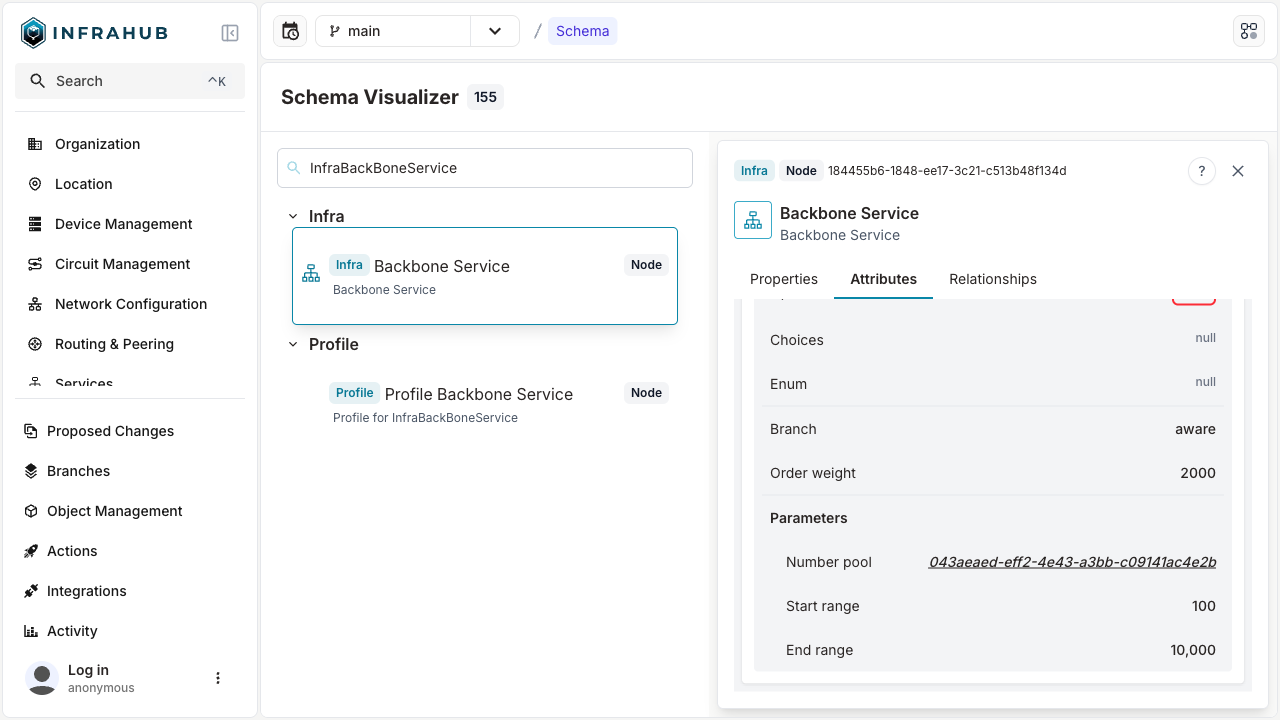
The Schema Visualizer shows the resulting schema.
Number ranges
parameters.ranges lists the ranges the pool allocates from. Each range has a start, an end and an optional weight, and the ranges must not overlap. Infrahub allocates from the ranges with the highest weight first, and from the lowest start among ranges with the same weight.
      - name: service_identifier
        kind: NumberPool
        read_only: true
        parameters:
          ranges:
            - start: 100
              end: 999
              weight: 10
            - start: 5000
A range without a start begins at the attribute's min_value, or at 1 when the attribute has no min_value or a min_value below 1. A range without an end stops at the attribute's max_value, or at the largest number Infrahub supports when the attribute has no max_value. The pool page shows that largest number as MAX, so the second range above is shown as 5000 - MAX. See Ranges without a start or an end for the full rule.
The declaration sets the ranges Infrahub creates for the pool:
- Declare no range, with neither
rangesnorstart_range/end_range, and the pool holds one range without a start or an end. It allocates from 1 toMAX. - Declare
ranges: []and the pool holds no range. Every allocation from it fails withPool <pool> has no number the attribute accepts in its ranges., where<pool>is the pool's name and id. - Declare
start_rangeandend_rangeand the pool holds one range with those bounds. These two parameters are deprecated, see How to migrate number pools toranges. Set only one of them for a range without the other bound. They cannot be combined withranges.
When a later schema load changes the declaration, Infrahub adds, updates and removes the pool's ranges to match it. When a later load declares neither ranges nor start_range/end_range, Infrahub keeps the ranges the pool already holds. To remove every range, declare ranges: []. Infrahub refuses a schema load that leaves a number held by an object outside every range of the pool, and identifies the objects that hold those numbers.
The ranges of a pool declared in the schema can only be changed in the schema. Infrahub refuses a change made on the pool itself with ranges can't be updated on schema defined pools, update the schema in the default branch instead.
Allocation scope
parameters.allocation_scope lists the attributes and relationships of the kind, the scope elements, that divide the pool's numbers into allocation scopes. Each object receives the lowest free number among the objects of its own allocation scope. For a VLAN ID that only has to be distinct within each site, on a kind with a required site relationship:
      - name: vlan_id
        kind: NumberPool
        read_only: true
        parameters:
          allocation_scope: ["site"]
          ranges:
            - start: 100
              end: 999
The elements follow the same rules as on a pool you create in the web interface or the GraphQL API, described in Allocate numbers per site with allocation scopes. A schema load that does not follow one of them fails with an error of the form <kind>.<attribute>: allocation_scope: <reason>.
The scope cannot change once Infrahub has created the pool. A later schema load that declares other elements fails with allocation_scope can't be changed after the pool is created. The order of the elements does not matter.
Infrahub records each element by its id in the schema, which a rename keeps. When you rename an element, for example site to location:
- A load that renames it and declares
allocation_scope: ["location"]is accepted. The pool keeps its scope, and shows the new name. - A load that renames it and still declares
allocation_scope: ["site"]fails with"site" was renamed to "location"; update allocation_scope to the new name.
Renaming the kind that holds the NumberPool attribute, or the attribute itself, is refused while the pool exists, as described in Schema migration.
Viewing the pool
Once you create an InfraBackBoneService, open Resource Managers in the menu to view the pool Infrahub created for the attribute.
The pool is named Kind.attribute_name [uuid]. For an attribute declared on a generic, Kind is the generic, so the pool in this example is named InfraService.service_identifier [uuid]. The pool page shows a Managed by schema tag.
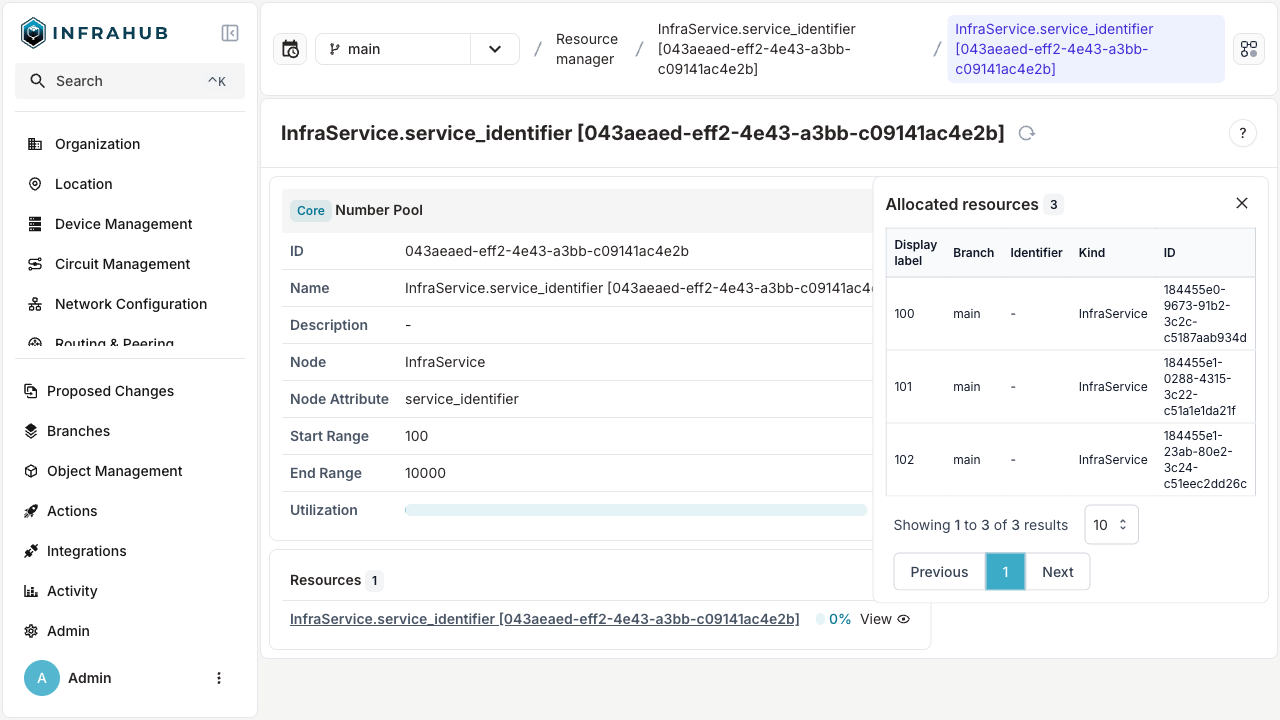
To update the parameters of a NumberPool attribute requires performing a schema update.
Deleting the pool
To remove the pool, remove the attribute by setting state: absent on it in the schema. After the schema load, Infrahub deletes the pool once the schema of every branch has removed the attribute or no longer declares it as NumberPool. The numbers stay on their objects, and no pool tracks them.
# yaml-language-server: $schema=https://schema.infrahub.app/infrahub/schema/latest.json
---
version: "1.0"
generics:
  - name: Service
    namespace: Infra
    description: "Services"
    human_friendly_id: ["name__value"]
    order_by:
      - name__value
    display_label: "{{ name__value }}"
    attributes:
      - name: name
        kind: Text
        label: Name
        optional: false
        order_weight: 1
      - name: service_identifier
        state: absent
        kind: NumberPool
        read_only: true # Required
        parameters:
          ranges:
            - start: 100
              end: 10000