Release 1.10.0
| Release Number | 1.10.0 |
|---|---|
| Release Date | June 23rd, 2026 |
| Tag | infrahub-v1.10.0 |
We're excited to announce the release of Infrahub, v1.10.0!
The headline addition is graph path traversal - a new way to ask the question Infrahub's graph was built to answer: how is this connected to that? A new GraphQL API and a visual topology explorer let you trace every path between two objects, or find everything reachable from a single node for impact analysis. Infrahub Enterprise also adds native LDAP authentication, completing external authentication for organizations without an OIDC/OAuth2 identity provider.
Alongside these, the release centers on three themes: authentication & identity - LDAP for Enterprise, auto-creation of account groups from identity-provider claims, and a reworked SSO account-identity model; performance & reliability - branch merges executed at the database level, precise artifact regeneration that only rebuilds what a commit actually changed, and a lighter computed-attribute and task pipeline; and API ergonomics - a structured, machine-readable GraphQL error catalogue and richer order_by controls for schema designers.
⚠️ This release includes several breaking changes. Read the Breaking changes section before upgrading - in particular the new structured GraphQL error codes, the reserved node_metadata name, restricted inheritance on internal Core generics, the BuiltinIPPrefix.resource_pool change and the restriction on using double underscores in schema attribute and relationship names.
⚠️ Single Sign-On accounts. v1.9.0 began capturing additional identity information against accounts created from OAuth2/OIDC providers, and warned that a future release would consume it. This is that release. v1.10.0 identifies SSO accounts by the provider-issued identity (sub) rather than the display name. A transitional setting, INFRAHUB_SECURITY_SSO_ACCOUNT_NAME_FALLBACK (enabled by default), still lets an SSO login reuse a pre-existing account by matching its display name, so upgrades remain smooth. Make sure every SSO user has logged in at least once, then disable the fallback as a hardening step - see Reworked SSO account identity below.
Main changes
Graph path traversal and topology explorer
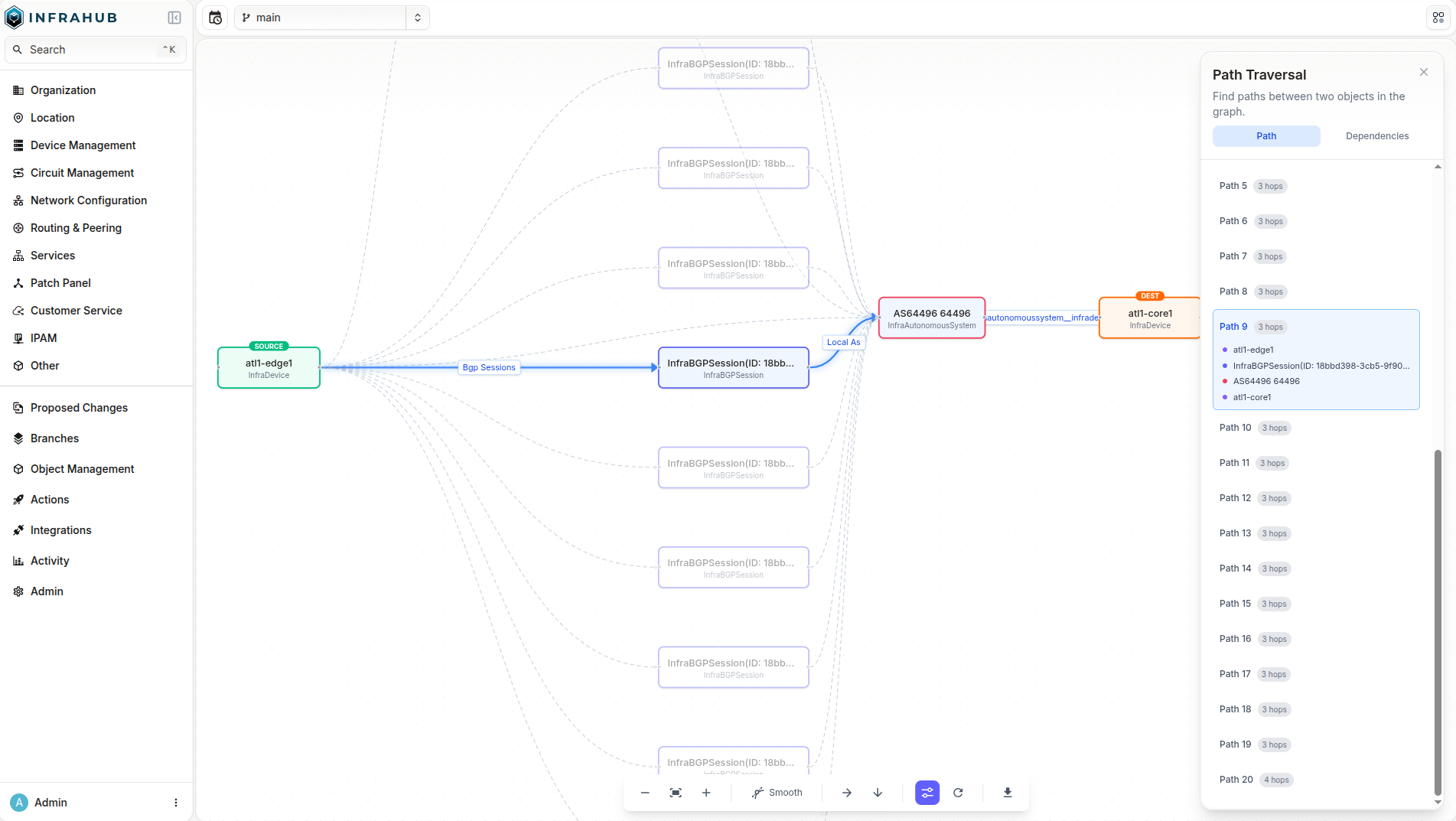
Infrahub's data is stored in a graph, and 1.10 exposes the graph's most natural capability: traversal. Two new top-level GraphQL queries let you walk relationships across the entire model - not just physical cabling, but any relationship between objects.
InfrahubPathTraversalfinds the paths between two specific objects. Given asource_idand adestination_id, it returns the connecting paths (shortest first) as an ordered list of hops, each hop naming the node and the relationship traversed. Bound the search withmax_depthandmax_paths, and narrow it withkind_filter,relationship_filter,excluded_kinds, andexcluded_namespaces.InfrahubReachableNodesanswers "what depends on this?" Given asource_idand a list oftarget_kinds, it returns every reachable object of those kinds together with the shortest path to each - ideal for blast-radius and impact analysis ("if this device goes offline, what's affected?").
Traversal is branch- and time-aware, read-only, and permission-safe: any path that crosses an object the user cannot read is dropped entirely rather than leaked. A set of internal namespaces (Core, Internal, Builtin, Lineage, Profile, Template) is always excluded so results stay focused on your data; excluded_namespaces only adds to that set.
In the UI, a new Topology Explorer renders results as an interactive graph built on React Flow with automatic layout. You can switch between path mode and dependency mode, filter by kind and namespace, highlight an individual path, and step between paths from the keyboard. Object detail pages add a Trace from this object action to launch the explorer pre-seeded with that node. Because results are returned over GraphQL, the same traversal is available for AI assistants over the MCP server, allowing agents to get a full contextual understanding of data in the intended infrastructure graph.
LDAP authentication (Enterprise)
Infrahub Enterprise now supports native LDAP authentication against Active Directory, OpenLDAP, and other RFC 4510-compliant directories. This gives organizations that have no OIDC/OAuth2 identity provider a first-class external-authentication path that coexists with local accounts and SSO - all three can be active at once and converge on the same session, account, and group handling. On first successful login an Infrahub account is provisioned automatically, matching existing SSO behavior.
Configuration is via INFRAHUB_LDAP_* environment variables and is validated at startup. You can point Infrahub at one or more servers (the first is primary, the rest act as failover), choose bind-then-search with a service account, select the username_attribute appropriate to your directory (for example sAMAccountName on AD or uid on OpenLDAP), and secure the connection with LDAPS or STARTTLS. Optional group mapping (group_enabled) matches LDAP group membership - including nested groups - against existing Infrahub CoreAccountGroup names, granting permissions through the usual account-group → role → permission chain. Combined with auto-created groups (below), group membership can be provisioned on first login with no manual setup.
This feature is available on Infrahub Enterprise only.
Auto-create account groups from your identity provider
Infrahub can now create account groups automatically from identity-provider claims on login, so you no longer have to pre-create a CoreAccountGroup for every group your IdP (or LDAP directory) reports. The feature is opt-in and off by default.
Activate it by setting a claim filter:
security.auto_create_groups_filter(INFRAHUB_SECURITY_AUTO_CREATE_GROUPS_FILTER) - a regular expression, or an ordered list of them, matched against each incoming group claim. The first match wins. A named capture group(?P<name>...)becomes the local group name (for example^LDAP/group/(?P<name>.+)$mapsLDAP/group/network-engtonetwork-eng); with no capture the full claim is used. Non-matching claims are dropped, so unrelated IdP groups never appear in Infrahub. Setting this filter is what activates the feature; leaving it empty keeps auto-creation off.security.auto_create_groups_max_per_login- caps the number of new groups created in a single login (default50). Reuse of existing groups is never capped. If the cap is hit, surplus claims are dropped, a warning event is emitted, and the login still completes.
Auto-created groups start with no roles or permissions and run on every external login (OIDC, OAuth2, and native LDAP). If at least one claim matches, it takes precedence over the existing security.sso_user_default_group fallback; if none match, that fallback still applies.
Reworked SSO account identity
Single Sign-On accounts are now keyed on the stable, provider-issued subject identifier (sub) together with the provider and protocol, stored on a dedicated CoreExternalIdentity node, rather than on the user's display name. This removes a class of problems where two users sharing a display name could collide, or where a changed display name produced a duplicate account on the next login. The human-readable name is now stored on the account's label attribute and is refreshed when it becomes stale.
To keep upgrades smooth, the transitional setting INFRAHUB_SECURITY_SSO_ACCOUNT_NAME_FALLBACK (security.sso_account_name_fallback, enabled by default) allows an SSO login that has no linked identity yet to reuse a pre-existing account that matches by display name. This setting is deprecated and will be removed in a future release. The recommended sequence is: upgrade, have every SSO user log in at least once so their CoreExternalIdentity is created, then disable the fallback. Once it is disabled, any SSO account that never re-logged in will be treated as new and a duplicate account will be created - so complete the re-login step first.
Structured GraphQL error catalogue
GraphQL errors are now structured and machine-readable. Every entry in a GraphQL errors[] array includes an extensions block with:
extensions.code- a stable string identifier such as"NODE_NOT_FOUND"or"AUTHENTICATION_REQUIRED".extensions.data- a typed payload specific to that code (may be empty).extensions.http_status- the integer HTTP status.
You can now branch on a stable code instead of parsing the human-readable message, which remains present but is explicitly not part of the stable contract. Multi-field validation failures emit one error per offending field, each with its own code, data, and a path pointing at the exact input - enabling single-pass form validation. The catalogue defines codes including NODE_NOT_FOUND, AUTHENTICATION_REQUIRED, TOKEN_EXPIRED, PERMISSION_DENIED, ATTRIBUTE_REQUIRED, ATTRIBUTE_INVALID_TYPE, ATTRIBUTE_CONSTRAINT_VIOLATION, BRANCH_NOT_FOUND, and SCHEMA_NOT_FOUND, with UNDEFINED_ERROR as a fallback for any uncatalogued exception.
This is a breaking change for consumers that previously read extensions.code as an integer - see Breaking changes for migration guidance. REST (/api/...) responses are unchanged.
Order by metadata and explicit sort direction
Schema order_by entries add two capabilities, letting designers set smarter defaults without passing an ordering argument on every query or view:
- Order by object-level metadata:
node_metadata__created_atandnode_metadata__updated_atsort by the timestamps Infrahub tracks on every node. - Add an explicit direction: any entry may end in
__ascor__desc(for examplename__value__desc,node_metadata__created_at__desc). Without a suffix, ascending is assumed, so existingorder_bydefinitions keep their current behavior.
The new grammar is honored consistently across top-level listings, relationship-peer listings, and hierarchy (ancestors/descendants) listings, and a node UUID tiebreaker is always appended so ordering - and pagination - is stable across all paths.
nodes:
  - name: Note
    namespace: Documentation
    order_by:
      - node_metadata__created_at__desc   # newest first by creation time
    attributes:
      - name: title
        kind: Text
The same grammar is available at query time through the GraphQL order argument, which accepts an by: [OrderByItem!] list at the root level:
query {
  DocumentationNote(order: { by: [{field: "node_metadata__created_at", direction: DESC}]}) {
    edges { node { title { value } } }
  }
}
Two behavior changes to note: a query-time order argument now fully replaces the schema-level order_by default instead of layering on top of it, and node_metadata is now a reserved attribute/relationship name (see Breaking changes).
Object templates can assign groups to their instances
Object Templates now expose two new relationships, member_of_groups_for_instances and subscriber_of_groups_for_instances. Groups assigned through these fields are propagated to every object created from the template, mirroring the resource-pool pattern. The existing member_of_groups and subscriber_of_groups continue to apply to the template object itself only.
# On a template: every instance created from it joins "production-devices"
member_of_groups_for_instances:
  - production-devices
Smarter artifact regeneration on repository changes
When a Proposed Change includes commits to a linked repository, Infrahub now regenerates only the artifacts whose transform source, GraphQL query, or artifact definition was actually affected by the change - instead of regenerating every artifact in the repository. A typo fixed in an unrelated README no longer triggers a regeneration sweep across thousands of nodes.
Detection automatically follows Jinja2 transitive includes ({% include %}, {% import %}, {% extends %}) and a Python transform's package directory. For dependencies Infrahub cannot detect automatically - templates loaded dynamically, or helper modules imported at runtime - you can declare extra files with a new optional watch: key on jinja2_transforms and python_transforms entries in .infrahub.yml. Track dependencies explicitly for both Python and Jinja2 transforms.
jinja2_transforms:
  - name: device_config
    template_path: "templates/device.j2"
    watch:
      files:
        - "templates/partials/"          # directory entries are recursive
        - "templates/macros/common.j2"
The rollout is self-healing: Transformations imported before the upgrade keep working unchanged and conservatively regenerate on any file change in their repository until their next import, after which they switch to the precise behavior automatically - no manual migration. Read-only repositories now participate fully even when sync_with_git is False.
Faster, more reliable branch merges
The merge of a branch or Proposed Change has been reworked along three axes:
- Performance - the merge logic moved from in-memory processing down to the database level. Previously the diff was loaded and serialized one piece at a time into Cypher; large merges that could take tens of minutes are now substantially faster and more robust.
- Stability - removing the step-by-step in-memory serialization eliminates a class of failure modes that could leave an instance in a hard-to-recover state. A specific correctness fix: the merge can now correctly delete an object whose kind or inheritance was changed on the default branch after the merging branch forked.
- Failure handling -
infrahub upgradeno longer overwrites the status of branches in a terminal state (MERGED,DELETING), so they no longer reappear asNEED_UPGRADE_REBASEafter an upgrade.
Generator dispatch within a Proposed Change is also more precise: a Generator instance is now only re-run when the diff touches a field its GraphQL query actually reads, rather than for every instance that merely shares a relationship target with a changed node.
Reworked database migration experience
Database migrations - run on upgrade via infrahub db migrate - are now far more transparent and controllable. The command adds a rich-based, staged console output plus several new flags: --check (report state without applying), --plan (show the execution plan and the Cypher query names without running anything), --verbose (detailed per-migration output), and --migration-number (apply a single migration). Two new commands, infrahub db showmigrations and infrahub db showmigration <n>, list all migrations with their applied/pending status and describe an individual migration. You can see exactly which step is running without being flooded by default.
UI: path-based tab navigation and unified data fetching
Two structural improvements make the web UI faster and more predictable:
- Path-based tab navigation - tabs on the Profile, Branch details, Proposed change, and Object details pages are now in the URL path (
/profile/tokens,/branches/foo/data,/proposed-changes/abc/checks,/objects/CoreTag/abc/members) instead of a?tab=query parameter. Each tab is deep-linkable and can be bookmarked, browser back/forward moves between tabs as distinct history entries, and each tab's content is lazy-loaded. Old?tab=bookmarks still load the page but land on its default tab - re-bookmark from the new URL. - Unified data-fetching layer - the UI now uses a single library (TanStack Query) for all GraphQL access, where it previously mixed two with caching disabled. Lists, detail pages, and forms share one caching layer, so returning to a page you just visited reuses the data instead of fetching it again, and the JavaScript bundle is smaller. No user action is required and there are no URL changes.
The account token list page was also redesigned for a cleaner, more readable layout.
Ecosystem updates
Recent releases across the Infrahub tooling during this cycle:
Infrahub Sync 2.0.0
- Reduce execution time on scheduled, recurring syncs by extracting only the records that have changed since the last successful run on supported adapters, rather than re-reading the full dataset each time.
- Add new models to a sync without defining an explicit
order, which is now derived automatically from the schema mapping. - Run scheduled syncs without risking mass deletions, with a row-count check that validates each resource against its last successful baseline and stops the run if a source shrinks beyond the configured threshold.
- Audit or troubleshoot any run after it completes, working from the snapshots, change plans, and metadata that each diff and sync now writes to disk.
- Review the upgrade notes before scheduling syncs against custom or non-thread-safe adapters, now that concurrent loading, parallel execution, and full extraction are enabled by default.
Infrahub AI skills
Infrahub AI Skills give an AI assistant built-in Infrahub expertise, so a team can build, query, and audit Infrahub from natural language. They are now ready for everyday use.
- A full set of skills — build and manage schemas, objects, checks, generators, transforms, and menus; analyze a live instance; audit a repository; and import data, each driven from natural language.
- Branch-first by default — every data change opens on a branch, so AI-assisted work follows the same review flow as any other change.
- More efficient generators — a Generator can build related objects from a single query response instead of one request per object.
- Operational support — a diagnostics skill collects a redacted support bundle, and a
reporting-issuesskill files sanitized bug reports and feature requests in the right repository. CoreFileObjectsupport — work with file-bearing nodes.
A documentation site covers installation and each skill. Release notes
Infrahub MCP server
The Infrahub MCP server lets AI assistants and a LLM (Claude Desktop/Code, Cursor, custom agents) work with Infrahub over the Model Context Protocol, and it is now ready to run in production as a shared service.
- Query and change data — query Infrahub data and open Proposed Changes for review from any MCP-compatible client.
- Self-correcting queries — error responses include schema hints, so an agent can fix an invalid query and retry instead of failing.
- Deployment — a multi-arch container image published to
registry.opsmill.io/opsmill/infrahub-mcp-server, available as an optional service in Docker Compose and theinfrahub-helmchart (mcp-server.enabled: true), with deployment and agent-integration guides. - Authentication and write controls — pass-through authentication runs each agent under the user's own Infrahub API token, preserving the permission model and audit trail; a read-only mode (
INFRAHUB_MCP_READ_ONLY=true) leaves write tools unregistered; and writes target an isolated per-session or user-specified branch instead of main, aligning with the Proposed Change workflow. - Reliable session branches — a session branch is validated before reuse, so an unusable branch fails with a clear reason rather than partway through.
- Multi-change continuity — a single AI conversation can span multiple Proposed Changes, with automatic session-branch recovery and a reset tool.
Infrahub Python SDK
The Python SDK and infrahubctl keep pace with Infrahub 1.10, so its new capabilities are available from your own code and automation.
- Trace relationships from your own scripts — follow the paths between objects, or find everything that depends on one, with new traversal methods that bring 1.10's graph traversal into automation.
- Return query results in the order you need — set an explicit order with
Order.by, the same control now available in the schema. - Manage schemas from the command line — fetch a schema or collection from the marketplace at a pinned version, or export an existing schema to disk, with new
infrahubctlcommands.
Breaking changes
Read this section before upgrading.
Structured GraphQL error codes
GraphQL error responses now return a stable string code in extensions.code (for example "NODE_NOT_FOUND", "AUTHENTICATION_REQUIRED"), a typed extensions.data payload, and a new integer extensions.http_status. Previously extensions.code was an integer mirroring the HTTP status (most visible on the /graphql authentication short-circuit path).
// Before
{ "errors": [ { "message": "Authentication required.",
  "extensions": { "code": 401 } } ] }

// After
{ "errors": [ { "message": "Authentication required.",
  "extensions": { "code": "AUTHENTICATION_REQUIRED", "http_status": 401, "data": {} } } ] }
Consumers that read the integer code (for example if (extensions.code === 401)) must migrate. Move numeric checks to extensions.http_status, or - preferably - switch on the stable string code (extensions.code === "AUTHENTICATION_REQUIRED"). This affects any GraphQL client, including external integrations. REST (/api/...) responses are unchanged.
node_metadata is now a reserved name
With the new metadata-aware order_by grammar, node_metadata becomes a reserved attribute and relationship name. A schema that literally uses node_metadata as an attribute or relationship name will fail to load on upgrade and must be renamed. Malformed order_by entries (an unsupported metadata field, a bad direction token such as __descending, or duplicate/conflicting entries) are now rejected at schema-load time with an actionable error naming the offending node and entry.
Note also the behavior change above: a query-time order argument now fully replaces the schema-level order_by default rather than layering on top of it.
Restricted inheritance on internal Core generics
Continuing the namespace-restriction work started in 1.9 (which covered CoreGenericRepository and CoreWebhook), several additional built-in Core generics that have special internal handling now restrict inheritance to the Core namespace. Any user-defined node schema that inherits from one of the generics below must be removed - and its data deleted - before upgrading. Infrahub will refuse to load a violating schema and the upgrade will not complete. The newly restricted generics are:
CoreCredentialCoreGenericAccountCoreResourcePoolCoreIPPoolCoreTransformationCoreBasePermissionCoreMenuCoreCommentCoreThreadCoreValidatorCoreKeyValueCoreTriggerRuleCoreActionCoreNodeTriggerMatch
BuiltinIPPrefix.resource_pool now returns the CoreIPPool generic
A new CoreIPPool generic groups CoreIPPrefixPool and CoreIPAddressPool, and BuiltinIPPrefix.resource_pool now points at it. This fixes the IP-prefix detail "Resource Pool" tab so it lists both pool types that reference the prefix; a database migration consolidates the relationships on upgrade. Because resource_pool now returns the abstract generic, GraphQL queries that selected concrete-pool fields directly under resource_pool must use inline fragments. Fields on the CoreResourcePool generic (name, description) still select directly.
# Before
query {
  BuiltinIPPrefix { edges { node { resource_pool { edges { node {
    name { value } default_address_type { value }
  } } } } } }
}

# After
query {
  BuiltinIPPrefix { edges { node { resource_pool { edges { node {
    name { value }
    ... on CoreIPAddressPool { default_address_type { value } }
    ... on CoreIPPrefixPool  { default_prefix_type  { value } }
  } } } } } }
}
Single sign-on account identity
SSO accounts are now keyed on the provider-issued sub rather than the display name (see Reworked SSO account identity). The transitional INFRAHUB_SECURITY_SSO_ACCOUNT_NAME_FALLBACK setting (default enabled, deprecated) preserves the old display-name matching during the transition. Ensure all SSO users log in once after upgrading before you disable it, otherwise accounts that have not re-logged in will be treated as new and duplicated.
Schema's using double underscores for an attribute or relationship name are invalid
The double underscore __ is used in Infrahub's schema as a path separator. Attributes and relationships containing a double underscore in their name will be rejected. If you are using a schema that uses __ in the name of attribute or relationship, then you will have to rename them prior to upgrading.
In our documentation you can find how to rename existing schema elements: https://docs.infrahub.app/schema/migration#rename-existing-elements
Migration of an Infrahub instance
Before you upgrade an instance of Infrahub, we strongly advise you to delete branches that are no longer needed within Infrahub. Deleting old branches helps speed up the upgrade process and avoids spending time running migrations for branches that are no longer needed.
Please read the Breaking changes section above before starting the upgrade. In particular, confirm you have no schema extensions inheriting from CoreGenericRepository or CoreWebhook, and that no client code still references the removed GraphQL queries or _updated_at field.
Please make sure to upgrade any existing installations of the infrahub-sdk to v1.22.0.
Please make sure to backup your instance of Infrahub and make sure you are familiar with and have tested the restore procedure. For more information visit https://docs.infrahub.app/backup
First, stop the existing Infrahub instance
docker compose down
Second, update the Infrahub version running in your environment.
Below are some example ways to get the latest version of Infrahub in your environment.
- For deployments via Docker Compose, download the updated Docker Compose file
curl https://infrahub.opsmill.io -o docker-compose.yml
- Set the
VERSIONenvironment variable and start the environmentexport VERSION="1.10.0"; docker compose pull && docker compose up -d
- For deployments via Kubernetes, utilize the latest version of the Helm chart supplied with this release
Third, once you have the desired version of Infrahub in your environment, run the migrations.
Infrahub provides the infrahub upgrade command to start these migrations.
Note: If you are running Infrahub in Docker/K8s, this command needs to run from a container where Infrahub is installed.
docker compose exec infrahub-server infrahub upgrade
Finally, restart all instances of Infrahub.
docker compose restart
Migration of a dev or demo instance
If you are using the dev or demo environments, we have provided invoke commands to aid in the migration to the latest version.
The below examples provide the demo version of the commands, however similar commands can be used for dev as well.
git fetch origin
git checkout infrahub-v1.10.0
git pull
git submodule update --init
invoke demo.stop
invoke demo.pull
invoke demo.upgrade --rebase-branches
invoke demo.start
If you don't want to keep your data, you can start a clean instance with the following command.
Warning: All data will be lost, please make sure to backup everything you need before running this command.
git fetch origin
git checkout infrahub-v1.10.0
git submodule update --init
invoke demo.destroy demo.build demo.start demo.load-infra-schema demo.load-infra-data
The repository infrahub-demo-edge has also been updated, it's recommended to pull the latest changes into your fork.
Full changelog
Security
- Bumped transitive docs dependencies to address Dependabot advisories:
dompurify>= 3.4.0,follow-redirects>= 1.16.0,lodashandlodash-es>= 4.18.0,postcss>= 8.5.10, anduuid(v11) >= 11.1.1.
Added
-
Object Templates now expose
member_of_groups_for_instancesandsubscriber_of_groups_for_instancesrelationships. Groups assigned through these fields are propagated to every object created from the template, mirroring the resource-pool pattern. The existingmember_of_groupsandsubscriber_of_groupson a template continue to apply to the template itself only. (#9094) -
Per-provider
groups_claimsetting for OAuth2 and OIDC providers: configure the JSON key used to extract the user's groups from the IdP claim payload (defaultgroups). See the SSO guide for details. (#9144) -
Added graph path traversal feature with visual topology explorer. Users can discover paths between any two nodes, find dependencies from a source node, filter by kind and namespace, and explore the graph interactively with React Flow visualization.
-
Infrahub can now auto-create account groups from identity-provider claims on SSO login. Opt in by configuring a claim filter under
security.auto_create_groups_filter, with an optional per-login cap. -
The GraphQL
orderargument now uses a single, structured interface for ordering results:order: {by: [{field: "name__value", direction: ASC}, {field: "node_metadata__created_at", direction: DESC}]}fieldis an attribute (name__value), a relationship attribute (owner__name__value), or node metadata (node_metadata__created_at/node_metadata__updated_at). It no longer carries a trailing__asc/__descsuffix.directionis an enum (ASC/DESC) and defaults toASCwhen omitted.- When provided,
byfully replaces the schema'sorder_bydefault. It works at the root level, on many-relationship fields, and on hierarchical (ancestors/descendants) relationships.
The
node_metadatafield on theorderargument is deprecated; order by metadata throughbyusing thenode_metadata__created_at/node_metadata__updated_atfields instead.node_metadatacannot be combined withbyin the same input.Schema-level
order_byentries are unchanged and still reference object-level metadata (node_metadata__created_at) with an optional__asc/__descsuffix. A UUID tiebreaker is always appended so ordering is stable across paths.Breaking change:
node_metadatais a reserved attribute and relationship name. Schemas that literally usenode_metadataas an attribute or relationship name will fail to load and must rename the offending element.
Changed
-
Breaking: GraphQL error responses now carry a stable string code in
extensions.code(for example"NODE_NOT_FOUND","AUTHENTICATION_REQUIRED") and a typedextensions.datapayload, plus a new integerextensions.http_status. Previouslyextensions.codewas an integer mirroring the HTTP status. Consumers reading the integer code (most commonly on the/graphqlauth-short-circuit path) must migrate to switching on the string code; numeric checks now readextensions.http_status. REST/api/...responses are unchanged. -
HFID attribute values are now indexed in Neo4j for faster lookup. A migration normalizes existing HFID values to consistent all-string format and adds database indexes. The HFID lookup query has been simplified to match directly on the stored value instead of reconstructing per-field filters.
-
Improve merge performance by moving the logic to the database level
-
Improved design of the account token list page
-
Prefect task read queries optimized to fetch only required fields.
client.all()andclient.filters()calls replaced with targetedexecute_graphql()queries indisplay_labels,hfid,computed_attribute,git, andgeneratorstasks, significantly reducing data transfer per workflow execution. -
Refined graph path traversal API: renamed
InfrahubDependenciestoInfrahubReachableNodes, renamednode_filterinput tokind_filter, added generic-kind support in filters, and hardened default-branch edge filtering. -
Rewrote the CLI reference and upgrade documentation for the 1.10 upgrade/migrate UX. The
--verboseflag oninfrahub db migrateandinfrahub upgradenow correctly describes that it controls internalinfrahub/prefectlogger output (not per-migration progress, which is always shown). Developer-facingRaises:blocks are no longer leaked into the rendered CLI reference. The upgrade overview now explains the six-step upgrade pipeline, what operators should expect to see during an upgrade, and how to usedb showmigrations,db showmigration N, anddb migrate --plan. Every migration now carries a requireddescriptionfield thatdb showmigration Nsurfaces, so operators can see what each migration does without reading the source. Migrations 068–073 ship with real descriptions; older migrations are stubbed asN/Afor now. The migration console no longer renders Richfile.py:NNNdebug tags on every line. -
Several built-in
Coregeneric schemas that have special handling in Infrahub now restrict inheritance to theCorenamespace via therestricted_namespacesfield. This prevents user-defined schemas from inheriting from generics whose code paths assume a specific internal structure.Breaking change. Any user-defined node schema that inherits from one of the generics listed below must be removed (and its data deleted) before upgrading. Infrahub will refuse to load a schema that violates these restrictions and the upgrade will not complete.
The newly restricted generics are:
CoreCredentialCoreGenericAccountCoreResourcePoolCoreIPPoolCoreTransformationCoreBasePermissionCoreMenuCoreCommentCoreThreadCoreValidatorCoreKeyValueCoreTriggerRuleCoreActionCoreNodeTriggerMatch
-
Tab navigation on detail pages (Profile, Branch details, Proposed change, Object details) now uses URL path segments (
/profile/tokens,/branches/foo/data,/proposed-changes/abc/checks,/objects/CoreTag/abc/members) instead of?tab=query parameters. Browser back/forward navigates between tabs as distinct history entries, and each tab's content is lazy-loaded per route. Bookmarks to old?tab=URLs render the default tab. -
The data-fetching layer in the UI has been unified on TanStack Query. Previously the frontend mixed two libraries (Apollo and TanStack) for talking to the GraphQL API, with caching disabled globally. Lists, detail pages and forms now share a single caching layer, so navigating back to a page you just visited reuses the data instead of it again, and the JavaScript bundle is smaller. No user action is required and there are no URL changes from this update.
-
When a proposed change includes commits to a linked repository, Infrahub now regenerates only the artifacts whose transform source, GraphQL query, or artifact definition was actually affected by the change, instead of regenerating every artifact in the repository. Each regeneration decision is recorded in the proposed change's task log, naming the file, query, or definition field that triggered it. Transformations imported before this change keep working unchanged and adopt the precise behavior automatically on their next import; until then they conservatively regenerate on any file change in their repository.
For dependencies Infrahub cannot detect automatically, such as templates pulled in dynamically or helper modules imported at runtime, you can declare extra files with a new optional
watch:key onjinja2_transformsandpython_transformsentries in.infrahub.yml. Changes to a declared file or directory then trigger regeneration of that transform's artifacts.
Fixed
-
Removed the required asterisk from the "Sync with Git" checkbox on the create-branch form, since the checkbox is optional and the asterisk misleadingly implied it had to be checked. (#IFC-2747)
-
Added a new boolean input, allowing users to explicitly submit true, false, or null values. (#4418)
-
Stop
infrahub upgradefrom overwriting the status of merged or deleting branches. Branches in a terminal state (MERGED,DELETING) are now skipped, so they no longer reappear asNEED_UPGRADE_REBASEafter an upgrade. (#9103) -
Stop object-type conversion of agnostic nodes with aware attributes from re-opening merged or deleting branches. The "needs rebase" status now only applies to non-terminal branches. (#9103)
-
Prevent duplicated Node, Generic, Attribute, and Relationship schemas from being created in the case of a worker's in-memory schema cache being stale while updating schemas. (#9250)
-
Fix a bug in the merge logic that prevented the merge operation from deleting an object that had its kind or inheritance updated on the default branch after the branch being merged forked. (#9283)
-
Within a proposed change, Generator instances are now only re-run when the diff touches a field that the Generator's GraphQL query actually reads. Previously a Generator was dispatched for every instance sharing a relationship target with a changed node, even when the change touched no field the query depended on. (#9378)
-
Fix the "Resource Pool" tab on the IP prefix detail view so that it now lists both
CoreIPPrefixPoolandCoreIPAddressPoolpools that have the prefix as a resource. A newCoreIPPoolgeneric groups the two pool types and theBuiltinIPPrefix.resource_poolrelationship now points at it. A database migration retroactively consolidates the IP pool ↔ IP prefix relationships.Breaking change for GraphQL clients. Because
BuiltinIPPrefix.resource_poolnow returns the abstractCoreIPPoolgeneric (instead of the concreteCoreIPAddressPool), any existing GraphQL queries that selected fields directly underresource_poolwill need to be updated to use inline fragments for fields that are specific toCoreIPAddressPoolorCoreIPPrefixPool. For example:# Beforequery {BuiltinIPPrefix {edges { node { resource_pool { edges { node { name { value } default_address_type { value } } } } } }}}# Afterquery {BuiltinIPPrefix {edges { node { resource_pool { edges { node {name { value }... on CoreIPAddressPool { default_address_type { value } }... on CoreIPPrefixPool { default_prefix_type { value } }} } } } }}}Fields that exist on the
CoreResourcePoolgeneric (name,description) can still be selected directly without a fragment. -
Fixed Python transform based computed attributes not being configured after a repository commit update. The trigger template referenced
event.payload['commit']instead ofevent.payload['data']['commit']; starting with Prefect 3.7 an undefined template reference fails the whole automation action instead of rendering an empty string, so the setup workflow never ran. -
Proposed change action buttons (approve, reject, merge, close, draft) now surface the actual backend error message in the toast instead of a generic "An error occurred" message, making failures easier to diagnose.
-
The SSO default group (
sso_user_default_group) is now only assigned on a user's first login, when their external identity is created. Previously it was re-applied on every login whenever the identity provider returned no group claims, so an administrator who removed a user from the default group would find them added back on their next login. Groups derived from identity-provider claims continue to be synchronized on every login.
Housekeeping
- Refactored permission system to extract decision logic into a single
PermissionResolverclass.PermissionManagernow delegates resolution to the resolver and the permission report uses the same resolver, ensuring the GraphQL pipeline and UI report always agree.