Cluster backup and restore Enterprise Edition
If you're running Infrahub with a Neo4j cluster, follow these steps to backup from one node and restore to another while maintaining cluster integrity.
For standalone deployments, see Backup and restore.
Prerequisites for cluster operations
- Neo4j cluster with at least 3 nodes
- Administrative access to all cluster nodes
- Understanding of your cluster topology (leader and follower nodes)
Always run backup and restore commands as the neo4j user inside containers to avoid permission issues with data files.
Example cluster topology
| Node | Role |
|---|---|
database | Leader |
database-core2 | Follower |
database-core3 | Follower |
Backup and restore within a cluster
Step 1: Create backup from a follower node
docker exec -it -u neo4j infrahub-database-core2-1 bash
mkdir -p backups
neo4j-admin database backup --to-path=backups/ neo4j
ls backups
# Output should include:
# neo4j-2025-03-24T19-57-18.backup
Step 2: Transfer backup to target node
# Copy from source container to local
docker cp infrahub-database-core2-1:/var/lib/neo4j/backups/neo4j-2025-03-24T19-57-18.backup .

# Copy from local to target container
docker cp neo4j-2025-03-24T19-57-18.backup \
  infrahub-database-core3-1:/var/lib/neo4j/
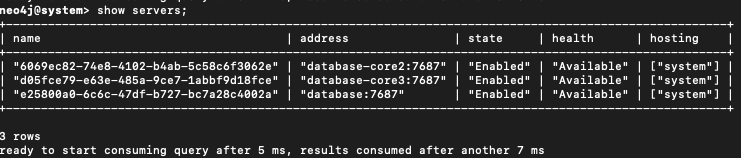
Step 3: Drop database cluster-wide
Connect to any cluster node:
cypher-shell -d system -u neo4j
DROP DATABASE neo4j;
SHOW SERVERS;
Step 4: Clean target node data
Connect to the target container:
docker exec -it -u neo4j infrahub-database-core3-1 bash
Remove any existing data to avoid corruption:
rm -rf /data/databases/neo4j
rm -rf /data/transactions/neo4j
Then restart the container to ensure a clean state:
docker restart infrahub-database-core3-1
Step 5: Restore backup on target node
Reconnect to the container:
docker exec -it -u neo4j infrahub-database-core3-1 bash
Run the restore command:
neo4j-admin database restore \
  --from-path=/var/lib/neo4j/neo4j-2025-03-24T19-57-18.backup neo4j
Step 6: Identify seed instance id
Connect via Cypher shell (on the system database):
cypher-shell -d system -u neo4j
Run:
SHOW SERVERS;
Note the serverId for your target node (example: d05fce79-e63e-485a-9ce7-1abbf9d18fce).

Step 7: Recreate database from seed
Run the following Cypher command:
CREATE DATABASE neo4j
TOPOLOGY 3 PRIMARIES
OPTIONS {
  existingData: 'use',
  existingDataSeedInstance: 'd05fce79-e63e-485a-9ce7-1abbf9d18fce'
};

Step 8: Verify cluster sync
Check that the database is coming online:
SHOW DATABASES;

Then validate cluster sync status:
SHOW SERVERS;

All nodes should eventually show the Neo4j database as online.
- If nodes show as dirty or offline, check logs and verify
/data/databases/neo4j/neostoreexists - The
CREATE DATABASE ... OPTIONS { existingData: 'use' }command is required to register restored data with the cluster
Restore cluster backup to standalone instance
If you need to analyze data from a production cluster in an isolated environment, follow these steps to restore a cluster backup to a standalone Neo4j instance.
Step 1: Create cluster backup
Create a backup from any cluster node:
neo4j-admin database backup --to-path=backups/ neo4j
# Resulting file: neo4j-2025-03-24T19-57-18.backup
Step 2: Transfer backup to standalone instance
docker cp neo4j-2025-03-24T19-57-18.backup \
  infrahub-database-1:/var/lib/neo4j/
Step 3: Prepare standalone instance
Connect to the container:
docker exec -it -u neo4j infrahub-database-1 bash
Clean any existing Neo4j database (optional but recommended):
rm -rf /data/databases/neo4j
rm -rf /data/transactions/neo4j
Drop the Neo4j Database
cypher-shell -d system -u neo4j
DROP DATABASE neo4j;
SHOW SERVERS;
Step 4: Restore the backup
Restore the backup file:
neo4j-admin database restore \
  --from-path=/var/lib/neo4j/neo4j-2025-03-24T19-57-18.backup neo4j
Step 5: Create the database
Run the following Cypher command:
CREATE DATABASE neo4j
Step 6: Verify the status
Check that the database is coming online:
SHOW DATABASES;

Then validate database status:
SHOW SERVERS;

This process restores only data, not cluster roles, replication, or configuration settings.
Related resources
- Database backup overview - Architecture and backup strategy concepts
- Backup and restore - Step-by-step instructions for standalone deployments