ODU map
Which of the two maps you are looking at
Every PoP carries two SVG artifacts and both are a map of Europe, with the same coastline, the same fourteen discs and the same 21 routes between them. What they say about a route is not the same thing.
| Artifact | Rendered title | Colour answers |
|---|---|---|
network-map | European optical core | Does a wavelength close on this route? |
odu-map | ODU capacity and grooming | Does another circuit fit on this route? |
The network map colours a route by the OSNR margin a reference mode has on it, which is a statement about the optical layer: whether light survives the span, the amplifiers and the ROADMs end to end. This map colours a route by the free tributary slots inside the wavelengths already lit on it, which is a statement about the digital layer carried inside that light. One route can be green on one map and red on the other, and both are correct. A wavelength with 25 dB of margin and no free slot carries nothing more.
Neither map derives from the other. The margin knows nothing about occupancy, and the slot count knows nothing about reach. There is no length, no loss, no margin and no span boundary on this drawing, because a multiplex section has no total length attribute for this map to state one from.
Where to find it
OTN Sites in the sidebar, then any PoP, then Artifacts, then odu-map.
Infrahub renders it from this repository on the branch you are reading, so the
same site shows a different picture on main and on a branch with services
provisioned. Nothing about the map is stored.
One copy per PoP, fourteen in all. Each copy draws the same network and emphasises its own site with a dark ring and heavier route casings, exactly as the network map does. Amsterdam Science Park carries neither map: it is a customer campus on a coarse metro tail, it belongs to no multiplex section, and it appears on no route the map draws.
Off a loaded stack you can render one without opening a proposed change:
uv run invoke load-repository   # if the stack has no repository yet
# then, from the Artifacts tab on any PoP, open or download odu-map
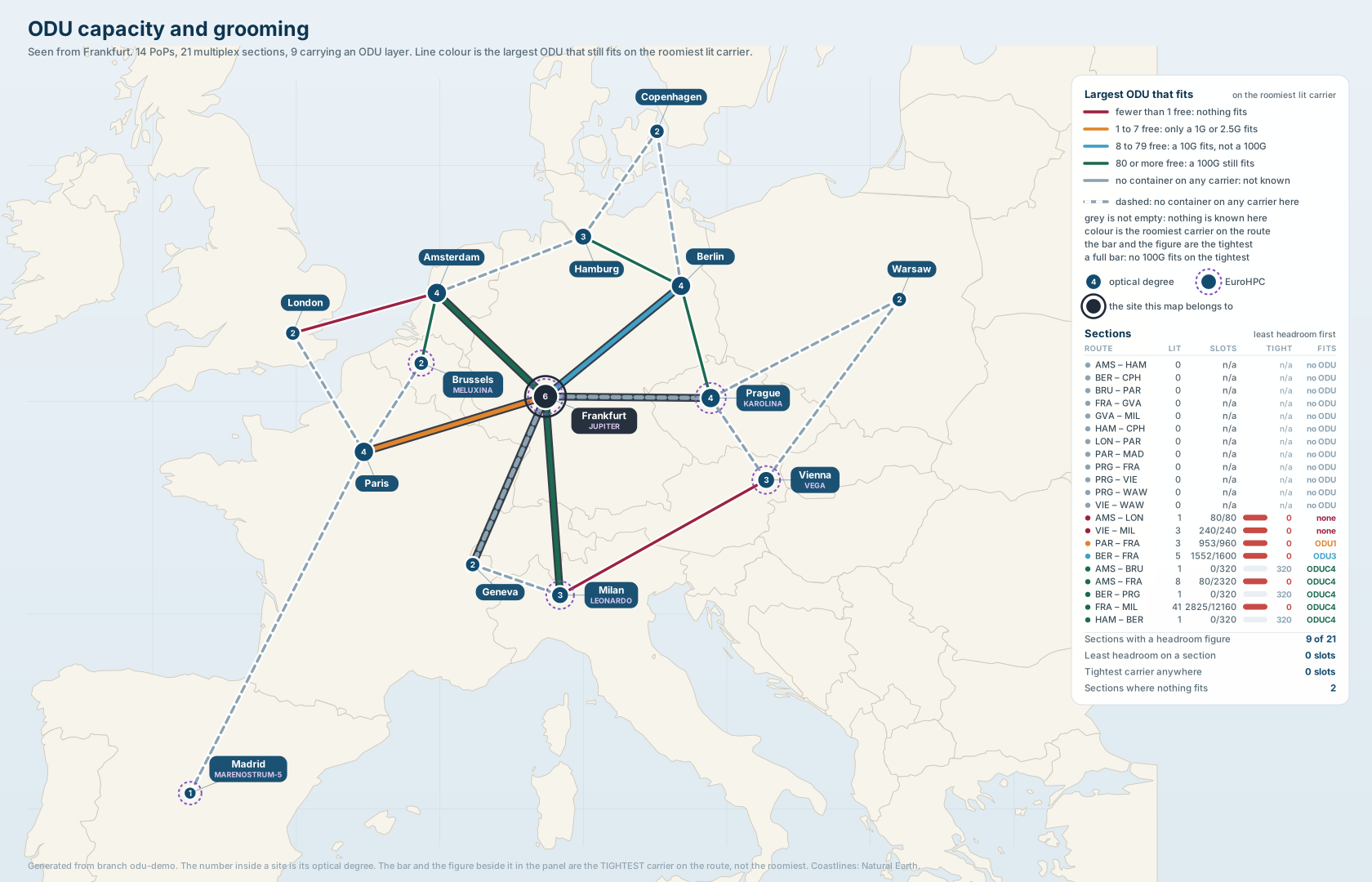
Frankfurt's copy of odu-map, off a branch carrying
demo/05_odu_mixed_fill.yml, so all five bands are on one picture. The default
branch shows only two of them: odu4 on eight sections and no-odu on
thirteen. The measured split in this picture is odu4 5, odu2 1, odu0 1,
full 2 and no-odu 12. Three of the five green routes are the
router-to-router OpenZR+ wavelengths, each an empty ODUC4 offering all 320 of
its slots. Every figure in the panel was checked against the containers on the
branch rather than taken from the drawing.
The five bands
A section is coloured by the largest container that still fits on its roomiest lit carrier. The edges are client sizes rather than round numbers, in tributary slots of 1.25 Gbit/s.
| Colour | Free slots on the roomiest lit carrier | Reads as |
|---|---|---|
| Green | 80 or more | A 100G still fits |
| Blue | 8 to 79 | A 10G fits, a 100G does not. A 40G needs 32 |
| Amber | 1 to 7 | Only a 1G or 2.5G fits |
| Red | 0 | Nothing fits |
| Grey, dashed | no container on any carrier | Not known |
One slot is the smallest client in the catalog, so below one nothing fits at all.
Eight slots is an ODU2, the 10G tributary. Thirty-two is an ODU3, which is
where a 40G client lands: STM-256 is 39.8 Gbit/s, so it needs 32 slots and not
the eight an ODU2 offers. Eighty is an ODU4, the 100G one. A band edge that
was not a client size would colour a route by an arithmetic nobody provisions
against.
The red band is unbounded below rather than pinned at zero, so an overfilled
carrier lands in it too. free_slots returns a negative figure for one instead of
clamping, and a band that matched only zero would drop that case on the floor.
Nothing fits and nobody knows are different cells
Red and grey are two different findings and the panel keeps them apart. The
largest-fit column prints none for a section that was measured and has no room,
and no ODU for one that was not measured at all. Two words rather than one
blank, because a blank cell in that column reads as a value nobody got round to
filling in and both of these are answers.
Grey also gets a dash on the route, not only a colour. On the network map one route in twenty-one is grey and a reader has nineteen coloured ones to compare it against. Here the whole map can be grey, and then colour alone says nothing.
Colour is the roomiest carrier, the panel is the tightest
Headroom answers "can I still provision here", and provisioning goes onto the emptiest wavelength with room. So the colour follows the roomiest carrier on the section.
The tightest carrier is reported separately, as a number and as a fill bar, in the same panel row. A section that looks roomy while one of its wavelengths is nearly full then shows both facts at once, and neither is averaged away.
An aggregate percentage was rejected for exactly that reason. Thirty-eight per
cent committed across a section whose ODU4 sits at 76 of 80 tells a planner they
have room where they have none. The bar is scaled to one ODU4, 80 slots, the
same yardstick the top colour band uses, so the colour and the bar measure the
section with one ruler at two ends.
Frankfurt to Milan on the shipped dataset is the section that settles this. It
carries 40 wavelengths, 37 ODUC4 offering 320 slots and three ODU4 offering 80,
all of them empty. A per-carrier mean would draw its bar three quarters full and
print the figure in red, when its tightest carrier is an untouched ODU4.
A dark carrier is not free capacity
A wavelength with no container on it contributes to no numerator and no denominator. Slot capacity exists once a container is written on the wavelength, so counting an unlit channel as available slots would invent capacity no equipment is offering. Counting it as zero free would be worse: an unprovisioned section would read as full.
The same rule runs upward through the tree. A child container of a type the slot
table cannot size makes its parent's free-slot figure unknown rather than being
computed from the children that are known. Four of the sixteen container types
have no G.709 slot figure: the flex container and the three SDH virtual container
types. A section holding one lands in the grey band even though it has a lit
carrier. The panel says so: the row shows a lit-carrier count and no ODU beside
it.
no-odu does not mean empty and available
On a clean main the grey band covers 13 of the 21 sections, and most of the
map is grey. That is the honest picture and not a broken render.
The 13 are sections with no wavelength at all, not sections whose wavelengths
are unlit. Every pre-provisioned carrier in the dataset arrives carrying an empty
line container, so a section with a carrier is lit. The 43 wavelengths in
objects/17_geant_carriers.yml cover eight sections and nothing else:
| Section | Lit carriers | Committed over offered | Band |
|---|---|---|---|
oms-fra-mil | 40 | 0 / 12080 | Green |
oms-ams-fra | 7 | 0 / 2240 | Green |
oms-ber-fra | 5 | 0 / 1600 | Green |
oms-par-fra | 3 | 0 / 960 | Green |
oms-vie-mil | 3 | 0 / 240 | Green |
oms-ams-bru | 1 | 0 / 320 | Green |
oms-ber-prg | 1 | 0 / 320 | Green |
oms-ham-ber | 1 | 0 / 320 | Green |
The other thirteen have no carrier, so they have no slot figure, so they are grey.
The band split on main is odu4 8 and no-odu 13, and
tests/unit/test_odudraw.py asserts that pair against the shipped dataset.
The panel
The map carries no exact figure at all, which is why the panel is longer than the network map's. Every number a reader wants is there, one row per section, ordered so the section that runs out of room first is the first row.
| Column | What it says |
|---|---|
| Dot and route | The band colour, and the two site codes |
| LIT | Lit carriers on the section, meaning carriers holding at least one container |
| SLOTS | Committed slots over slots offered, across those lit carriers |
| Bar | The tightest carrier on the section, against one ODU4 of room |
| TIGHT | The same figure as a number, in free slots |
| FITS | The exact largest container type that fits, or none, or no ODU |
Under the table are four totals: sections with a headroom figure, least headroom on a section, tightest carrier anywhere, and sections where nothing fits. The last two are the negative results, and they are counts rather than percentages because a percentage of twenty-one sections hides which ones.
There is no network-wide capacity total, deliberately. A wavelength runs end to end over several sections and every one of them counts it, so summing the per-section offerings would report more capacity than the network has. The per-section figures are the honest ones and the totals are the extremes over them.
The footer names the branch the figures were read from. A slot count is true of the branch it was read from and of nothing else.
The scenarios that put something on the map
Neither scenario file is loaded by .infrahub.yml. Both are scenario input under
demo/, and they can share one branch. One task makes that branch, loads both
files, provisions the eleven circuits the first one asks for and runs the
capacity check over what is left:
uv run invoke demo-odu
demo/04_odu_ten_in_one.yml, ten circuits in one wavelength. Ten STM-64
services from London to Milan each map into an ODU2 of 8 slots. All ten
groom into the same ODU4 line container, which offers 80. Ten eights are eighty,
so after the tenth that container reads 80 of 80 and the wavelength is out of
room. The eleventh service of the same size is refused, reason no-slots,
naming the container it did not fit and both slot figures. Grooming is tried
first and lighting second, so the refusal needs both to fail. The scenario also
spends the last usable block of spectrum on oms-fra-mil, taking it to
4,267,600 MHz of 4,800,000 with 532,400 MHz left in 29 blocks whose widest is
38,000 MHz. That is narrower than the narrowest mode in the catalog, so nothing
can be lit there and the lighting escape closes.
The band split on that branch is odu4 5, full 1, no-odu 15. Only
oms-ams-lon turns red, because the shared wavelength is the only lit carrier on
it. oms-ams-fra and oms-fra-mil stay green, and that is the correct reading
rather than a disappointment. A section is banded on its roomiest lit carrier,
and both of those still carry empty ODUC4 wavelengths offering 320 slots.
demo/05_odu_mixed_fill.yml, every band at once. Five bands are five
different sentences about a section, and a map showing one of them proves nothing
about the other four. This file puts at least one section in each, on one branch,
so the legend can be read against the picture. The measured split is odu4 5,
odu2 1, odu0 1, full 2, no-odu 12, over 21 sections. Three of the five
odu4 sections are the router-to-router OpenZR+ wavelengths, which this file
does not touch and which arrive empty.
It writes client containers directly rather than running the generator twenty
times, because the scenario is about what the map states and not about how the
containers arrived. oms-fra-mil is left green on purpose: all 40 wavelengths
cross it, the file fills eleven, and the remaining twenty-nine are still empty at
320 free. Filling it would take over a thousand more client containers. The model
does not pretend otherwise.
A branch with no ODU layer at all
Every route grey, dashed, and a caption in the title block naming the branch and saying no ODU layer is provisioned on it. The render succeeds; it is a caption rather than an error.
The default branch is not that picture. Its pre-provisioned wavelengths ship carrying empty line containers, so they are lit and their five sections land in a real band. The all-grey render is reachable on a branch whose containers have been removed, and the caption names the branch so nobody reads it as the model being empty.
Determinism
The same records always produce the same bytes, whatever order they arrive in. That is what makes a changed artifact worth looking at: the map moved because the branch did.
Coastlines
The land, the borders and the graticule are the same Natural Earth 1:50m outlines
the network map uses, embedded in the repository as generated Python data. Both
maps draw them through src/infrahub_demo_otn/mapchrome.py, the shared chrome,
and both run through src/infrahub_demo_otn/mapengine.py, the one drawing engine
that lays out sections, routes, title and panel for either map. Between them they
are the reason the two artifacts look like a pair. The
developer guide has the command
that regenerates the data, and
the golden renders are
what keep that sharing from moving either map.